Showing posts with label refactoring. Show all posts

Thursday, August 16, 2007

Keep it simple

Recently I saw pieces of code that could be simplified. I see such code often, however, recently I came across code that seemed to follow the same pattern

The patern was as in the following example:


private boolean someFlag;

...

public boolean isSomeFlagSet() {
if (someFlag) {
return true;
}
else {
return false;
}
}

Why not simply write:


public boolean isSomeFlagSet() {
return someFlag;
}

It is so much simpler!

Similarly to boolean flags, there where occurencies of other object types being used and methods invoked on them in the following manner:


public String getCity() {
if (address == null) {
return null;
}
else {
return address.getCity();
}
}

This can be also simplified (applying "change if-else to ?:" refactoring) to:


public String getCity() {
return address == null ? null : address.getCity();
}

Please strive for simplicity in your code (K.I.S.S. principle). Verbosity clutters the code and can hide the meaning or intention of it.

Monday, March 19, 2007

Refactoring or Redesign?

If you ever worked on a software that has grown organically over time, you will agree that many candidates for refactoring can be found in it. These are identified as pain points, smells or simply things that suck. The reason is that as the software grows, requirements change and code needs to adapt in order to support these changes.

JIRA is not an exception. JIRA team will spend around 30 hours in each eight week release cycle on refactoring of existing code, improving design, making it easier to extend the current code base with new features. At the iteration planning meeting last week, my colleagues and I were discussing how to spend this time in the most efficient way, debating what is refactoring and what is not. One of my colleagues raised a question: "Is is refactoring or redesign?"

The answer is: "It's both."

According to The Pragmatic Programmer: From Journeyman to Master written by Andrew Hunt and David Thomas:

At its heart, refactoring is redesign. Anything that you or others on your team designed can be redesigned in light of new facts, deeper understandings, changing requirements, and so on. But if you proceed to rip up vast quantities of code with wild abandon, you may find yourself in a worse position that when you started.

Clearly, refactoring is an activity that needs to be undertaken slowly, deliberately, and carefully. Martin Fowler offers the following simple tips on how to refactor without doing more harm than good:

  1. Don't try to refactor and add functionality at the same time.
  2. Make sure you have good tests before you begin refactoring. Run the tests as often as possible. That way you will know quickly if your changes have broken anything.
  3. Take short, deliberate steps: move a field from one class to another, fuse two similar methods into a superclass. Refactoring often involves making many localized changes that result in a larger-scale change. If you keep your steps small, and test after each step, you will avoid prolonged debugging.

Thursday, February 22, 2007

Log4J Logger vs. Category

Logging is the practice of recording sequential data. This is also a low-tech method of debugging and in some cases also the only way as the proper debugging tools may not be always available or applicable. Logging in Java can range from simple System.out.println() statements to usage of sophisticated logging frameworks.

At the time of writing there are several logging frameworks for logging in Java available. There is a popular and probably the most widely used Log4J framework. Younger brother of Log4J is the Java's Logging API that became part of Java SE in version 1.4. See How does the Java logging API stack up against log4j for comparison. The are many other logging frameworks: SimpleLog, jLo, Protomatter Syslog, etc.

There are also several frameworks that enable abstraction from logging frameworks, also known as logging bridges (Apache Commons Logging, log-bridge). These allow switching between logging frameworks. These and many others can be found at Open Source Logging Tools in Java at java-source.net.

Log4J was one of the early logging frameworks that gained popularity and is present in many source code bases. In some cases you could encounter usage of Category class rather than Logger. If you work or worked on projects that are built on top of relatively young frameworks, you may not even know that Category class exists as its natural habitat is in old Java code. I hadn't known that Category class existed until I saw it one day. I saw it in a place where I would usually use Logger class. Since that day I kept reminding myself to look at it and see what's different from Logger class and why would one use it.

So what is the difference between Category and Logger classes? The Java documentation in Category class states

This class has been deprecated and replaced by the Logger subclass. It will be kept around to preserve backward compatibility until mid 2003.

Logger is a subclass of Category, i.e. it extends Category. In other words, a logger is a category. Thus, all operations that can be performed on a category can be performed on a logger. Internally, whenever log4j is asked to produce a Category object, it will instead produce a Logger object. Log4j 1.2 will never produce Category objects but only Logger instances. In order to preserve backward compatibility, methods that previously accepted category objects still continue to accept category objects.

Then the following example shows how Category was used and how Logger should be used.

// Deprecated form:
Category cat = Category.getInstance("foo.bar");

// Preferred form for retrieving loggers:
Logger logger = Logger.getLogger("foo.bar");

And that's it. That's all you have to do to replace Category with Logger (apart from renaming the variable).

The documentation also says

There is absolutely no need for new client code to use or refer to the Category class. Whenever possible, please avoid referring to it or using it.

Why is this important? The plan is that from Log4J version 1.3 Category class will be removed! What can we do to prepare our code for Log4J 1.3? Well Preparing for Log4J version 1.3 has it all spelled out. It's worth to read if you want to understand all implications this upgrade may have. I just shamelessly paste the steps here:

  1. Never refer to the Category class directly, refer to Logger instead.
  2. Do not invoke the deprecated Category.getRoot method. Invoke Logger.getRootLogger method instead.
  3. Do not invoke the deprecated Category.getInstance(String) method. Invoke Logger.getLogger(String) method instead.
  4. Do not invoke the deprecated Category.getInstance(Class) method. Invoke Logger.getLogger(Class) method instead.
  5. Never refer to the Priority class, refer to Level class instead.
  6. Do not invoke the deprecated Category.setPriority(Priority) method. Invoke Logger.setLevel(Level) method instead.
  7. Do not invoke the deprecated Priority.toPriority(int) method. Invoke Level.toLevel(int) method instead. The same holds true for the other variants of the Priority.toPriority method.
  8. Never refer to the deprecated Priority.FATAL, Priority.ERROR, Priority.WARN, Priority.INFO, Priority.DEBUG fields. Refer to the Level.FATAL, Level.ERROR, Level.WARN, Level.INFO, Level.DEBUG fields instead.

  9. If you confiugure appenders programmatically, do not forget to invoke the activateOptions method of an appender after you have instantiated it and set its options.

and as the above mentioned document says

For 99.99% of users, this translates to the following string find-and-replace operations:
  1. Replace the string "Category.getInstance" with the string "Logger.getLogger".
  2. Replace the string "Category.getRoot" with the string "Logger.getRootLogger".
  3. Replace the string "Category" with the string "Logger".
  4. Replace the string "Priority" with the string "Level".

Happy logging!

Tuesday, January 30, 2007

Method Invocation vs. Local Store

On many occasions, I have seen the code that invokes the same method on the same object several times within few consecutive lines of code. Let's have a look at the following code snippet:

if(person.getDateOfBirth() != null) {
System.out.println("Date of birth: " + person.getDateOfBirth());
}

When I see this repetition of code I feel like I should refactor it order to remove the duplicity. Refactoring itself would be very easy. The return value would be stored in a local variable and used wherever the original method was invoked.

The example above could be refactored in following way:

final Date dob =person.getDateOfBirth();
if (dob != null) {
System.out.println("Date of birth: " + dob);
}

The reason behind my urge to refactor such code is in performance. Method invocation can repeatedly cause execution of potentially expensive operations such as slow database access, network communication or some lengthly calculations.

If in the example above the date of birth of person object was very unlikely to change between the two getDateOfBirth() method invocations and therefore it was a safe bet to store the result locally in a local variable.

Invoking a method once, storing the result in a local variable could speed the application up. However, it could also break it.

Why would a local store break the application? Well, it may not, it really depends on the invoked method itself and the way our application uses the returned value. If a method performs some side operations it actually may rely on its invocation. Such operations can be for example increasing a counter, retrieving updated stock ticker info, etc. The return value may also depend on the number or time of invocations or other things that may affect it. Another example would be an application that performs business logic based on the most recent data.If the data that method returns varies frequently and business logic depends on it, storing it may not be such a good idea.

I'll give you a very bad example here, but this is the extreme where the result is guaranteed to return a different result almost every time:

if (Math.random() < 0.5) {
// notify developer A
} else if(Math.random() >= 0.5) {
// notify developer B
} else {
// this should never happen,right?
// :-)
// but it does happen with likelihood of 25%
}

So it really brings us down to the point where we have to examine what the method does, what data it returns and what the client does with the returned data.

Conclusion

  • Use local store if the invoked method returns consistent results and has no side-effects. Method invocation could be slower or potentially break the client code.

  • Use method invocation if the method invoked has side-effects or the data returned changes frequently and the client relies on the latest result.

Sunday, December 17, 2006

Recursion vs. Loop

Problem

Imagine that your application is meant to process an XML file. It is given a tag and needs to find a "special tag" that this tag might be nested in. This problem has several solutions. I tackled a similar problem some time ago and I will present you with some of the solutions that I considered.

While loop

private SpecialTag findSpecialTag()
{
Tag parent = this.getParentTag();
while (parent != null && !(parent instanceof SpecialTag))
{
parent = parent.getParentTag();
}
return (SpecialTag) parent;
}

Do-while loop

private SpecialTag findSpecialTag()
{
Tag parent = this;
do
{
parent = parent.getParentTag();
}
while (parent != null && !(parent instanceof SpecialTag));
return (SpecialTag) parent;
}

Recursion

private SpecialTag findSpecialTag()
{
return findSpecialTag(this.getParentTag());
}

private SpecialTag findSpecialTag(Tag tag)
{
if (tag == null || tag instanceof SpecialTag)
{
return (SpecialTag) tag;
}
else
{
return findSpecialTag(tag.getParentTag());
}
}

Solution

In my personal opinion, I find the while loop cleanest and simplest to understand. Do-while loop gets a bit messy with the condition at the end and recursion is probably the worst. I find recursion a bit hard to follow. It can also introduce an extra method just for its own sake (as in this example).

I do not have a strong opinion on this topic. If you like to program recursions, while loops, do-while loops, or for loops, it's fine by me. I certainly will not change your code, but if you ask me to write some code, it'd most likely be a while (or for) loop.

I use while and for loops interchangeably. The previous example with while loop would look like this with for loop:

private SpecialTag findSpecialTag()
{
Tag p = this.getParentTag();
for(; p != null && !(p instanceof SpecialTag); p = p.getParentTag());
return (SpecialTag) parent;
}

What is your preference?

Saturday, August 19, 2006

Swich Statement code smell and Polymorphism

One of the symptoms of object-oriented programming is the lack of switch or case statements. Imagine that we have some client class that calculates the area and perimeter of particular geometrical shapes.

public class Client {
private double a;
private double b;
private double r;
...
public double calculateArea(int shape) {
double area = 0;
switch(shape) {
case SQUARE:
area = a * a;
break;
case RECTANGLE:
area = a * b;
break;
case CIRCLE:
area = Math.PI * r * r;
break;
}
return area;
}

public double calculatePerimeter(int shape) {
double perimeter = 0;
switch(shape) {
case SQUARE:
perimeter = 4 * a;
break;
case RECTANGLE:
perimeter = 2 * (a + b);
break;
case CIRCLE:
perimeter = 2 * Math.PI * r;
break;
}
return perimeter;
}
...
}

The previous code is clearly a poor design that limits the current client to only work with three types of shapes. The problem with switch statements is the duplication and that is a code smell. There are usually several places in the code where the behaviour slightly deviates and these switch statements are present (e.g. in calculateArea and calculatePerimeter methods). Even worse case is if we work with objects where the switch is replaced by multiple instanceof conditions.


public class Client {
...
public double calculateArea(Object shape) {
double area = 0;
if (shape instanceof Square) {
Square square = (Square) shape;
area = square.getA() * square.getA();
}
else if (shape instanceof Rectangle) {
Rectangle rectangle = (Rectangle) shape;
area = rectangle.getA() * rectangle.getB();
}
else if (shape instanceof Circle) {
Circle circle = (Circle) shape;
area = Math.PI * cirle.getR() * cirle.getR();
}
return area;
}

public double calculatePerimeter(Object shape) {
double perimeter = 0;
if (shape instanceof Square) {
Square square = (Square) shape;
perimeter = 4 * square.getA();
}
else if (shape instanceof Rectangle) {
Rectangle rectangle = (Rectangle) shape;
perimeter = 2 * (rectangle.getA() + rectangle.getB());
}
else if (shape instanceof Circle) {
Circle circle = (Circle) shape;
perimeter = 2 * Math.PI * cirle.getR();
}
return perimeter;
}
}

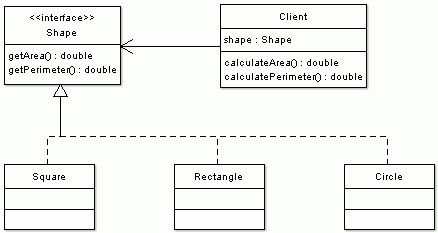
To improve the desing we make Square, Rectangle and Circle have a commont root. By that I mean that they either extend the same class, such as AbstractShape or that they implement a common interface, such as Shape or ideally both.

Then we can eliminate the switch statement code smell very easily. We replace it with polymorphism.

Shape.java file
public interface Shape {
public double getArea();
public double getPerimeter();
}

Square.java file
public class Square implements Shape {
private double a;
...
public double getArea() {
return a * a;
}
public double getPerimeter() {
return 4 * a;
}
}

Rectangle.java file
public class Rectangle implements Shape {
private double a;
private double b;
...
public double getArea() {
return a * b;
}
public double getPerimeter() {
return 2 * (a + b);
}
}

Circle.java file
public class Circle implements Shape {
private double r;
...
public double getArea() {
return Math.PI * r * r;
}
public double getPerimeter() {
return 2 * Math.PI * r;
}
}

And such refactoring simplifies the Client code. It also allows for easy extensibility by implementations of other shapes without changing a single line of Client code.

public class Client {
private Shape shape;
...
public double calculateArea() {
return shape.getArea();
}
public double calculatePerimeter() {
return shape.getPerimeter();
}
}

Another way of looking at it is from the responsibility point of view. Why should the client be responsible for calculating the area or the perimeter; or have a knowledge about shape's internals (e.g. number of sides, radius, etc.) It is the responsibility of each shape and all that the client needs to know is that a shape has a perimeter and area.

To sum this all up:

Sunday, August 13, 2006

Improved Map Iteration

When some one new to Java comes to play, first thing they do, they re-invent the wheel. Such wheel can be a class that is already implemented in java.util package. Yes! Collections and Maps! Later, as you become a senior Java developer you alredy know the narrow places in the "Utils" valley. And yet we can make mistakes.

Such mistake can be the following implementation of the method that calculates the size of the collection.

private Collection myStuff = ...

public int calculateSize() {
int count = 0;
for (Iterator it = myStuff.iterator(); it.hasNext(); it.next()) {
count++;
}
return count;
}

This can be easily fixed by

public int calculateSize() {
return myStuff.size();
}

Another, more frequent example of bad performance is a condition where one wants to know if there are any objects in the collection, but does not really care how many there are.

if (myStuff.size() == 0) {
// do something
}

Remember size() method may possibly calculate the size and therefore generally is slower than a call to isEmpty() method. Therefore the fix is obvious.

if (myStuff.isEmpty()) {
// do something
}

Could you imagine that I once worked for a company where the senior developers did not know about Iterators? So instead of

for (Iterator it = myStuff.iterator(); it.hasNext();) {
Object item = it.next();
// do something with the item
}

they had

for (int i = 0; i < myStuff.size(); i++) {
Object item = myStuff.get(i);
// do something with the item
}

and on top of that myStuff was a Vector, which is synchronized. Very sloooow code!

Nevertheless my point is: Know your collections!

Now back to the topic of improving the Map iteration. Well, it really depends what we need to do at each step of our iteration.

If you need to iterate over the keys of the Map do this

for (Iterator it = myMap.keySet().iterator(); it.hasNext();) {
Object key = it.next();
// do something with the key
}

And if you need to iterate over the values of the Map do this

for (Iterator it = myMap.values().iterator(); it.hasNext();) {
Object value = it.next();
// do something with the value
}

But what if we need both the key and the value? The usual approach and very bad approach is to get the set of keys, iterate over them and get the value for each key.

for (Iterator it = myMap.keySet().iterator(); it.hasNext();) {
Object key = it.next();
Object value = myMap.get(key);
// do something with the key and the value
}

What is wrong about this? Nothing! You can do it this way and it's perfectly fine. It is just very inefficient as at each iteration a map needs to look up the value for a given key. It is better to iterate over map entries. There is a special interface Map.Entry that can be used to retrieve the key and the value of each entry in the map. So the previous example can be transformed into

for (Iterator it = myMap.entrySet().iterator(); it.hasNext();) {
Map.Entry entry = (Map.Entry) it.next();
Object key = entry.getKey();
Object value = entry.getValue();
// do something with the key and the value
}

Don't forget to change myMap.get(key) to entry.getValue(), otherwise you are not gaining anything from this modification. I did this recently, I omitted to change it, even worse - I changed it to myMap.get(entry.getValue()). As a result the map was not finding anything... Luckily, we had tests around the class I modified and my stupid mistake was caught early.

Have the tests ready before making changes! Even experienced people make mistakes.

Thursday, August 10, 2006

Empty String

How many times have you coded a check for String being null or empty? Countless times, right? I have. We use some ready-to-use classes from open source frameworks or we write our own StringUtils class. More or less they all implement the same thing and it always looks similar to the following code snippet:

String s = ...
if (s == null || s.equals(""))...

or similar to the following, which trims leading and ending whitespaces

String s = ...
if (s == null || s.trim().equals(""))...

Of course you could also do this:

"".equals(s)

which is a case when you do not care if String s is null and you don't have to worry about NPE as if won't happen ("" is never null, whereas s could be). But that's another story.

I have had "extra" warnings turned on in my IDE for couple of days. But today my IDE suprised me when it highlighted

[1] s.equals("")

and suggested that I could optimize it by making it to

[2] s.length() == 0

And guess what?! The IDE was right! I looked at the suggested code briefly, gave it a bit of thought and agreed that it would probably be faster. Method [1] creates a new instance of the String (an empty String, yes I know that all instances of "" would be caught during compilation and optimized and that they all would refer to the same instance). Just to be on the safe side I looked at the source of the String class.

And here is what I found. The length() method returns and integer primitive, which is not calculated with each method call to length(). It is rather a member variable (or constant, as Strings are invariants) of String class that is calculated when new String instance is created. So this method would be super fast.

536   public int length()
537 {
538 return count;
539 }

On the other side, there is the equals() method, which is fast as well, but not as fast as length method. It has to do a check for class, class casting and comparison of count members (that's what length method returns).

684   public boolean equals(Object anObject)
685 {
686 if (! (anObject instanceof String))
687 return false;
688 String str2 = (String) anObject;
689 if (count != str2.count)
690 return false;
691 if (value == str2.value && offset == str2.offset)
692 return true;
693 int i = count;
694 int x = offset;
695 int y = str2.offset;
696 while (--i >= 0)
697 if (value[x++] != str2.value[y++])
698 return false;
699 return true;
700 }

And remember the few important points when it comes to Strings:

  • Do not compare Strings with == operator. Unless you want to compare the object references. Use equals() method.

  • Do not construct new instances like new String("abc"). Simple "abc" will do, unless you really mean that you need a new instance of String with same value. Read more about How useful is String(String) constructor

  • Do not concatenate Strings in loops using + operator. It's faster to use StringBuffer (or StringBuilder, which is in Tiger and is not synchronized) append() and then toString() methods instead. The plus (+) operator constructs new String object each time.

Sunday, May 14, 2006

Bad API and worse coding practices

Writting a good public API is a very hard job. The API exposes some of the system's functionality and if you plan on releasing your software in the future several times, you better spend a good portion of your time on the design of the public interfaces to your system.

One of the reasons is that you do not want your API to change over time. A single change would make the new release incompatible with the previous ones and all the third-party code that was written and worked well needs to be fixed, before it can work again with your latest shiniest version.

In the past, I worked on a project where I was faced with a custom API. And let me tell you, the interface was far from ideal. Not because it changed over time, but because it was not designed well (or designed at all?) Probably designed by street-side programmers who not only exposed the API via abstract classes that you had to extend (there is this thing called Interface in Java) but also having concrete classes in the method signatures (interfaces anyone?).

For example a method looked like this

public Vector getGetNamesFromContacts(Vector contacts)...

So not only you cannot use your collection of choice but you have to use Vector. I ask you, why Vector? We all know how slow they are when compared with unsynchronized lists (e.g. ArrayList). I don't really think that the synchonization was necessary.

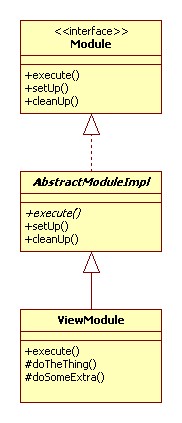
Anyway, imagine that you are given the following abstract class that you can extend. Remember, the API is really bad and you have no access to the Module interface. In fact, there may not even be such an interface. The only thing that is exposed to the outside world is the abstract AbstractModuleImpl class.

There are three methods in AbstractModuleImpl class: execute(), setUp() and cleanUp(), all are public, execute is also abstract and let's say that their signatures do not really matter at this time.

These methods are given and you can implement them in order to get the set-up before work, actual work and clean-up after work done.

In the next step, we implement our own class. This class is named ViewModule and extends the given abstract AbstractModuleImpl class. As the super class is abstract and our class is concrete (meaning not abstract) we need to implement all methods that were defined as abstract - execute().

We also added and implemented two protected methods doTheThing() and doSomeExtra(). These methods are called from inside execute() method.

Later we also wanted to implement EditModule class. This class shares 90% of the code similarity with ViewModule. Naturally, that would be best implemented through inheritance. The base class would implement the common methods and then the concrete classes with varied functionality would be implemented as its sub-classes.

I wrote about simplicity of the design in extreme programming in my blog entry Simplicity and XP.

In our case we leave ViewModule as is and extend from it. As you can see from the class diagram EditModule class extends ViewModule class. It overrides execute() and doTheThing() methods. It does not override doSomeExtra() as this method is re-used as is.

Everything looks quite fine, right? But here comes the twist! One of the respected street-side programmers (who does not used Iterators and uses Vectors for everything he codes, just because the other API designed did) in that company told me that this approach would not work. The reason being that it would only work when our implementation class directly extends AbstractModuleImpl. He tried it before, and it did not work. I do not know what he tried, but did not want to qustion his judgement. I just took it as a fact. But still... why would anyone impose such ridiculous limitation on public API?

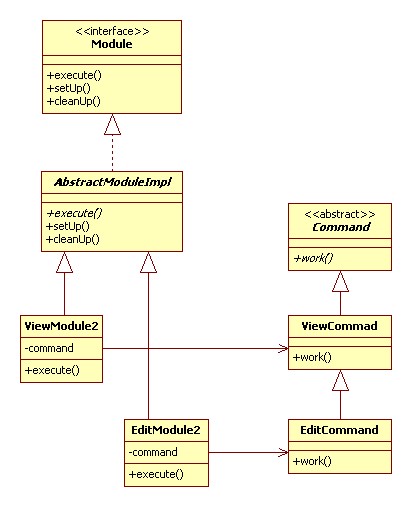
Anyway I proposed the following design. It was a bit more complicated, worked around the limitation of the API and still reused most of the code.

In this case ViewModule2 and EditModule2 share the only similarity, which is they call work() method on their associated command objects.

In this way I could still implement 90% of the common code in ViewCommand class and reuse it in EditCommand class. Also ViewModule2 and EditModule2 classes directly extended AbstractModuleImpl as was required.

Anyway, despite the effort, the code changes were not understood by the street-side programmers (each module should be implemented as one class so it can be delivered stand-alone) and when I returned to work on Monday the code was reverted back to original implementation before my changes and EditModule class was implemented by deadly copy-paste-modify operation (ZERO reusability) based on the code of ViewModule class.

Thursday, March 23, 2006

Raw code vs. readable code vs. fast code

My usual approach to implementation of some functionality is to capture my mind process in a programming language. After some time of writing, compiling, testing and rewriting I reach the stage where I'm comfortable with it. I usually keep two things in mind: to make the code easily readable and understandable by others; and to make it fast. How you weight these two is up to you.

For example lets have a look at following method implementation:

01 private String getAttribute(String method) {
02 // get past the first 3 chars (ie, "get" or "set").
03 String retVal = method.substring(3);
04 retVal = checkIfPrimaryKey(retVal);
05 if (!"".equals(retVal) && retVal.equals(method.substring(3))) {
06 String firstChar = retVal.substring(0,1).toLowerCase();
07 retVal = firstChar + retVal.substring(1);
08 }
09 return retVal;
10 }
11
12 private String checkIfPrimaryKey(String name) {
13 return "Id".equals(name)? "" : name;
14 }

The code runs and all is OK. All would be fine if I was working on this project by myself, which rarely happens these days. The problems arise when people can not understand some one else's code. We are all different and we think in different ways. The intentions I had were not expressed very well and for some developers it may take a while to understand why I used integer 3 on line 3 and 5 and what are lines 3 to 7 doing.

Let's make it clear! First, let's make the meaning of 3 easy to understand.

01 private String getAttribute(String method) {
02 final int PREFIX_LENGTH = 3; // first 3 chars (ie, "get" or "set")
03 // get past the first 3 chars (ie, "get" or "set").
04 String retVal = method.substring(PREFIX_LENGTH);
05 retVal = checkIfPrimaryKey(retVal);
06 if (!"".equals(retVal) && retVal.equals(method.substring(PREFIX_LENGTH))) {
07 String firstChar = retVal.substring(0,1).toLowerCase();
08 retVal = firstChar + retVal.substring(1);
09 }
10 return retVal;
11 }
12
13 private String checkIfPrimaryKey(String name) {
14 return "Id".equals(name)? "" : name;
15 }

Now it's clear that I'm working with 3-character prefix. PREFIX_LENGTH was also made final in order to avoid its unintentional modification. If you did not notice this before it might be clearer now that PREFIX_LENGTH is used in two places. Furthermore it is used in exactly the same way. This is a small piece of duplicated code and doesn't smell that much. Let's refactor it in order to indicate what it is and also to remove the duplicate method call to retrieve the substring (optimization for speed).

01 private String getAttribute(String method) {
02 final int PREFIX_LENGTH = 3; // first 3 chars (ie, "get" or "set")
03 String attribute = method.substring(PREFIX_LENGTH);
04 String retVal = checkIfPrimaryKey(attribute);
05 if (!"".equals(retVal) && retVal.equals(attribute)) {
06 String firstChar = retVal.substring(0,1).toLowerCase();
07 retVal = firstChar + retVal.substring(1);
08 }
09 return retVal;
10 }
11
12 private String checkIfPrimaryKey(String name) {
13 return "Id".equals(name)? "" : name;
14 }

Notice how the comment disappeared. It was no longer needed as the “good” name of the variable tells us that it holds the core of the method name. Who cares that it is a substring after first three characters.

Sometimes it makes sense to name the return value properly as well. It may not improve readability in small methods as much, but if the method body is long it can be a good idea to call it something meaningful. In this case we can drop “retVal” completely. Just rename all its references to “attribute”.

01 private String getAttribute(String method) {
02 final int PREFIX_LENGTH = 3; // first 3 chars (ie, "get" or "set")
03 String originalAttribute = method.substring(PREFIX_LENGTH);
04 String attribute = checkIfPrimaryKey(attribute);
05 if (!"".equals(attribute) && attribute.equals(originalAttribute)) {
06 String firstChar = attribute.substring(0,1).toLowerCase();
07 attribute = firstChar + attribute.substring(1);
08 }
09 return attribute;
10 }
11
12 private String checkIfPrimaryKey(String name) {
13 return "Id".equals(name)? "" : name;
14 }

Before going any further I want to point out that “checkIfPrimaryKey” method smells. And the smell is quite bad. Not only the method name does not implement what its name indicates but it does not make clear why it returns empty string and then our method has not work around it. Let's fix it.

01 private String getAttribute(String method) {
02 final int PREFIX_LENGTH = 3; // first 3 chars (ie, "get" or "set")
03 String attribute = method.substring(PREFIX_LENGTH);
04 if (!isPrimaryKey(attribute)) {
05 String firstChar = attribute.substring(0,1).toLowerCase();
06 return firstChar + attribute.substring(1);
07 }
08 return "";
09 }
10
11 private boolean isPrimaryKey(String name) {
12 return "Id".equals(name);
13 }

You can also notice that the empty string was taken out from the original checkIfPrimaryKey and introduced in our getAttribute method. You could also question the reason for having a one-line method. The reason is re-use. If you find this type of line reused over and over again it's best to have it as a method. Compilers are quite smart these days and they might inline this code in the places where it is used. So don't worry about the speed. Another good point in this case is that if the method was not private it could provide a good extension point. Subclasses could override this method to do some more sophisticated checks.

Another not very obvious issue is the index 1 in the block of code that changes the first character to lower case. Although its occurrence is in two consecutive lines, it is essentially the same case as was PREFIX_LENGTH. Let's make it a constant named ONE.

01 private String getAttribute(String method) {
02 final int PREFIX_LENGTH = 3; // first 3 chars (ie, "get" or "set")
03 String attribute = method.substring(PREFIX_LENGTH);
04 if (!isPrimaryKey(attribute)) {
05 // change first character to lower-case
06 final int ONE = 1;
07 String firstChar = attribute.substring(0, ONE).toLowerCase();
08 return firstChar + attribute.substring(ONE);
09 }
10 return "";
11 }

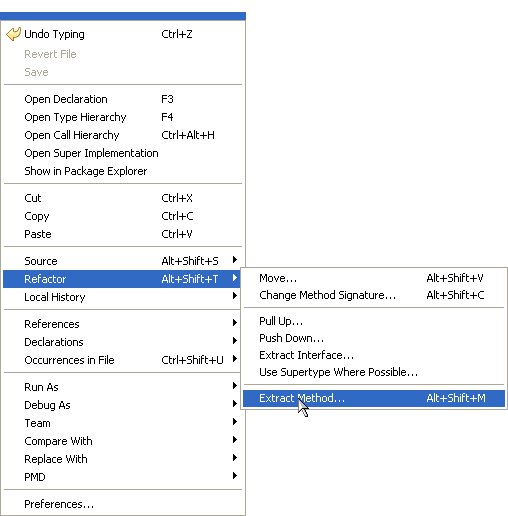
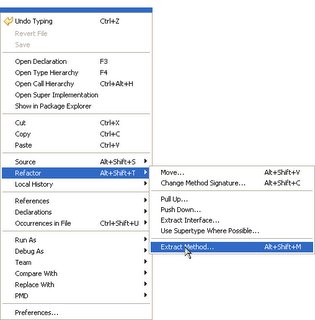
Let's refactor this method by pulling lines 5 to 8 out into a new method and replacing them with a call to this new method. This refactoring is called, as you would've guessed, “extract method”. Some clever IDEs can make this task automated. The following screen shots were made from Eclipse.

First select the code you want to extract
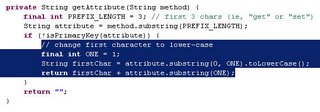
Right-click on it and extract the method as show in the menu
01 private String getAttribute(String method) {
02 final int PREFIX_LENGTH = 3; // first 3 chars (ie, "get" or "set")
03 String attribute = method.substring(PREFIX_LENGTH);
04 if (!isPrimaryKey(attribute))) {
05 return lowerFirstChar(attName);
06 }
07 return "";
08 }
09
10 // change first character to lower-case
11 private String lowerFirstChar(String s) {
12 final int ONE = 1;
13 String firstChar = s.substring(0, ONE).toLowerCase();
14 return firstChar + s.substring(ONE);
15 }

Some of us believe that less is better and try to shorten the number of lines as much as possible. The following listing exhibits this approach:

01 private static String getAttribute(String method) {
02 final int PREFIX_LENGTH = 3; // first 3 chars (ie, "get" or "set")
03 String attName = method.substring(PREFIX_LENGTH);
04 return isPrimaryKey(attribute) ? "" : lowerFirstChar(attribute);
05 }

This makes the method shorter, but the code became a little bit less readable and some junior programmers will find this harder to read or understand.

Some final notes

If you are using constants, i.e. variables that are defined final, it is better if you declare them on the class level with appropriate JavaDoc comment, and if only used internally make them private, e.g.

/** method name prefix length, e.g. “get” or “set” */
private static final PREFIX_LENGTH = 3;

This way the code is less cluttered, better documented and only created once (about this I am not sure as it may depend on the compiler). The last one is especially crucial for creation of constants that take a long time to create or consume a lot of resources.

BTW: Did you notice that this method does not account for boolean getters, e.g. "isGreen", where the prefix only takes two characters ("is")?

Conclusion

The are several rules that are worth when programming with clarity and speed in mind:

  • “one and only one place”
    means ease of change, testing and debugging

  • name matters
    naming conventions and good names need no code comments

  • if it's too hard to understand, refactor it to break the complexity down

Friday, March 17, 2006

To Boolean or not to Boolean

There is no reason to create new Boolean object. In 99.99% cases we are only interested in using a Boolean object that holds either true or false value. The only case where we might need to create a new instance is for instance comparison rather then value comparison (equals()), e.g.

new Boolean(true) == new Boolean(true)

Java Boolean class comes with two constants that will do the job: Boolean.TRUE and Boolean.FALSE.

private Boolean isNegative(int i) {
return new Boolean(i < 0);
}

Better way:

private Boolean isNegative(int i) {
return i < 0 ? Boolean.TRUE : Boolean.FALSE;
}

This might be trivial, but can significantly improve performance. Creating new objects is an expensive operation and it also consumes more memory that must be allocated to these objects and then potentially garbage collected.

Second issue that can potentially rise with using Boolean class is how to convert a String value to boolean. Boolean class offers two methods that accept String as a parameter:

  • static boolean getBoolean(String)

  • static Boolean valueOf(String)

Which one to use?

The JavaDoc for the later states: Returns a Boolean with a value represented by the specified String. The Boolean returned represents the value true if the string argument is not null and is equal, ignoring case, to the string "true".

The JavaDoc for getBoolean(String)states: Returns true if and only if the system property named by the argument exists and is equal to the string "true". (Beginning with version 1.0.2 of the JavaTM platform, the test of this string is case insensitive.) A system property is accessible through getProperty, a method defined by the System class. If there is no property with the specified name, or if the specified name is empty or null, then false is returned.

People tend to forget this from time to time and tend to use getBoolean(String), especially when require a boolean primitive as outcome. Fortunately, with good tests in place this is discovered and fixed in early development stages.

Therefore use getBoolean(String) only if you need to read system property value as a boolean. For String conversion always use valueOf(String)

String valid = getValidity(); // implemented elsewhere
boolean isValid = Boolean.valueOf(valid).booleanValue();

Any questions? Boolean.FALSE

Tuesday, March 14, 2006

How useful is String(String) constructor?

Good architectural design is essential. We can not expect junior programmers to know all APIs well. With good design good programming practices can be enforced and unintentional mistakes avoided. Architect’s and designer’s responsibility is to create a framework of interfaces, abstract classes, utility classes that other developers will use or implement.

Recently I came across this line

String value = new String(“some text”);

I have not seen String(String) constructor for a long while. Have you seen it recently? Probably not. And there is a good reason for it. For 99.9% of cases you won’t need it at all. It only serves as a copy constructor that takes a String as an argument and creates a new instance that represents the same string of characters. Further more first string created (“some text”) is ready for garbage collection on the very next line. It would only be useful if you were to compare the two strings as

someString == someOtherString

Generally, when I see such comparison it is a programming bug. In most of the cases the equals() method is used for String comparison.

someString.equals(someOtherString)

But that is another story. Anyway, back to String(String) constructor. Having this constructor may lead to unintentional object instance creation. When you create a String by putting anything between double quotes you already have an instance. There is no need to call new String(String). The following line will perfectly do the job.

String value = "some text";

I understand that the designers’ intention was to have a String copy constructor, but in this case, I do not believe, it was a wise step. A factory method would have been better. It could be called createNewInstance(String) or copy(String).

Good design is essential. But good design is not bullet proof. We still need to know the APIs, frameworks and things such as immutability of String objects.


Creative Commons License This work is licensed under a Creative Commons Attribution-NonCommercial-ShareAlike 2.5 License.