Multicolr Search Lab by Idée Inc.
And these are the images that match colors of my blog:
And these are the images that match colors of my blog:
I am creating a website for my wife's coffee shop and I needed to find out the font type they used on the signs and the menus. I was really wondering how I could identify the font.
It turned out to be quite simple. Thanks to WhatTheFont?!
The process was following:


Yeah, I know. It is not quite quite the same, the letter "r" looks a bit different, but other than that, it's a perfect match. I am quite happy with it. Much better than going through thousands of fonts manually.
I use Google Reader for reading blogs. It has become my daily chore as I need to keep track on things happening around our office (we blog internally and externally) as well as other things of my interest.
It was brought to my attention that Jon Hicks created new skin for Google Reader. I thought I would have a look.I had to install Stylish extension for Firefox first. Then I added a new style that I downloaded from Jon's website. And the result?
Before:
After:
I absolutely love it!
It has made reading blogs so much better. Why don't you give it a try?
If you ever worked on a software that has grown organically over time, you will agree that many candidates for refactoring can be found in it. These are identified as pain points, smells or simply things that suck. The reason is that as the software grows, requirements change and code needs to adapt in order to support these changes.
JIRA is not an exception. JIRA team will spend around 30 hours in each eight week release cycle on refactoring of existing code, improving design, making it easier to extend the current code base with new features. At the iteration planning meeting last week, my colleagues and I were discussing how to spend this time in the most efficient way, debating what is refactoring and what is not. One of my colleagues raised a question: "Is is refactoring or redesign?"
 The answer is: "It's both."
According to The Pragmatic Programmer: From Journeyman to Master written by Andrew Hunt and David Thomas:
At its heart, refactoring is redesign. Anything that you or others on your team designed can be redesigned in light of new facts, deeper understandings, changing requirements, and so on. But if you proceed to rip up vast quantities of code with wild abandon, you may find yourself in a worse position that when you started.
Clearly, refactoring is an activity that needs to be undertaken slowly, deliberately, and carefully. Martin Fowler offers the following simple tips on how to refactor without doing more harm than good:
- Don't try to refactor and add functionality at the same time.
- Make sure you have good tests before you begin refactoring. Run the tests as often as possible. That way you will know quickly if your changes have broken anything.
- Take short, deliberate steps: move a field from one class to another, fuse two similar methods into a superclass. Refactoring often involves making many localized changes that result in a larger-scale change. If you keep your steps small, and test after each step, you will avoid prolonged debugging.
Imagine that your application is meant to process an XML file. It is given a tag and needs to find a "special tag" that this tag might be nested in. This problem has several solutions. I tackled a similar problem some time ago and I will present you with some of the solutions that I considered.
private SpecialTag findSpecialTag()
{
  Tag parent = this.getParentTag();
  while (parent != null && !(parent instanceof SpecialTag))
  {
    parent = parent.getParentTag();
  }
  return (SpecialTag) parent;
}
private SpecialTag findSpecialTag()
{
  Tag parent = this;
  do
  {
    parent = parent.getParentTag();
  }
  while (parent != null && !(parent instanceof SpecialTag));
  return (SpecialTag) parent;
}
private SpecialTag findSpecialTag()
{
  return findSpecialTag(this.getParentTag());
}

private SpecialTag findSpecialTag(Tag tag)
{
  if (tag == null || tag instanceof SpecialTag)
  {
    return (SpecialTag) tag;
  }
  else
  {
    return findSpecialTag(tag.getParentTag());
  }
}
In my personal opinion, I find the while loop cleanest and simplest to understand. Do-while loop gets a bit messy with the condition at the end and recursion is probably the worst. I find recursion a bit hard to follow. It can also introduce an extra method just for its own sake (as in this example).
I do not have a strong opinion on this topic. If you like to program recursions, while loops, do-while loops, or for loops, it's fine by me. I certainly will not change your code, but if you ask me to write some code, it'd most likely be a while (or for) loop.
I use while and for loops interchangeably. The previous example with while loop would look like this with for loop:
private SpecialTag findSpecialTag()
{
  Tag p = this.getParentTag();
  for(; p != null && !(p instanceof SpecialTag); p = p.getParentTag());
  return (SpecialTag) parent;
}
What is your preference?
Getting inside the minds of customers is essential for achieving the "aha" effect. More importantly, don't listen to what your customers say! Observe what they do!
When there are people and machines we get four different types of communication:
When it comes to machine to human communication, is it important that we pay attention? There could be messages such as an engine light turns on in the car. It is our role, the role of software developers, to make these messages user-friendly. Otherwise the messages will be ignored or overlooked.
We have seen that AJAX can fail in keeping the user informed - the message does not make it through. It could be a case when a user votes on something, the request is made but the page does not get reloaded, so we need to highlight the fact that the vote was processed. The question is how to do it so the user sees it without affecting other "more important" things that the user is currently doing on the (same) page.
There has been a lot of work done in improving the user experience. Starting from Eliza chat bot and the subservient chicken in 2004 to today's websites that are very user-friendly: JetBlue, TiVo, Google, Apple.
It is all about designing an appropriate user experience. It's also about finding the fine line between practical and emotional (are you emotionally attached to this, do you find this useful, etc.)
Practical
Emotional
The real deal is that one you are able to break into people's habits and make them to use your application as a part of their daily rituals (not really an addiction), you will be successful.
Some of the interesting statistics mentioned were how the usage of mobile phones changed people's rituals and how these technologies saturated the market (Japan 90%, Korea 83%, Europe 68%, US 48%, world-wide 28%). I can see a great potential for growth here in Australia too. And there are some serious money too. In the US, 12-18 year-old kids spend around $4900 a year, which 48% of that is on mobiles (in China it is less than $100 a year). It was also interesting how people use their phones/devices. In US they are called cell phones (amongst popular ones are Palm and Blackberry). In EU and Australia they are called mobile phones and other brands and models are more popular (Nokia, Ericsson). In Singapore however, people may even have two of them. One that is more of a fashion statement and may not even look like a phone.
There is also a gap between what people think and how people live. As an example, you think that all people would wash their hands after using the toilet, but not all people do. We know that we develop applications and we can think of the ways people will use them. But people are very creative and they use our applications even in unimaginable ways. It's about going through the stages:
"I'm ready to try this out" -> PERCEPTION -> INTERACTION -> INTEGRATION -> "This works for me!"
And what is next? Web 3.0. Global brain = something like a combination of shared data and a search engine aggregating the knowledge spread all over the web.
 I attended the first day of the Web Directions South 2006 conference today. Some of the topics that were covered today were about the design of the web sites and web pages or the design in general. Since I read The Design of Everyday Things by Donal A. Norman (which I mentioned in one of my previous posts about Good Desing) I tend to look at things in a different way. And I also appreciate the good design of the things we use. A thing can have all it needs but if not designed well it will fail as it will be unusable (see the cover of the book and you'll get the idea at least – or read the whole book).
There was one of the things that I use in my everyday life, but only today I realized how brilliantly it was designed. Derek Featherstone has apparently same eye as me as he showed us the photo that he took the day before. It was a photo of
The pedestrian crossing button

How perfect it is! Not only you can see the big white arrow but if your eyesight is impaired you can touch and feel the smaller raised arrow. And that is not all! If you cannot see it, you can hear it ticking when the green light is on. And that still is not all! If you cannot see nor hear, you can still feel it. The button VIBRATES!!! Derek said it at the conference and was all excited about it. I did not believe. I had to touch it on my way home from the conference. It is true! It does vibrate!
How cool is that?! That is a successful design in practice. Way to go designers!
What is next? Well, as a software developer I will focus a bit more on designing the web applications in a way that all people can access them, even if they have some disabilities. Sometimes we go and design things that are cool, but not usable by all of us...
One of the symptoms of object-oriented programming is the lack of switch or case statements. Imagine that we have some client class that calculates the area and perimeter of particular geometrical shapes.
public class Client {
 private double a;
 private double b;
 private double r;
 ...
 public double calculateArea(int shape) {
     double area = 0;
     switch(shape) {
         case SQUARE:
             area = a * a;
             break;
         case RECTANGLE:
             area = a * b;
             break;
         case CIRCLE:
             area = Math.PI * r * r;
             break;
     }
     return area;
 }

 public double calculatePerimeter(int shape) {
     double perimeter = 0;
     switch(shape) {
         case SQUARE:
             perimeter = 4 * a;
             break;
         case RECTANGLE:
             perimeter = 2 * (a + b);
             break;
         case CIRCLE:
             perimeter = 2 * Math.PI * r;
             break;
     }
     return perimeter;
 }
 ...
}
The previous code is clearly a poor design that limits the current client to only work with three types of shapes. The problem with switch statements is the duplication and that is a code smell. There are usually several places in the code where the behaviour slightly deviates and these switch statements are present (e.g. in calculateArea and calculatePerimeter methods). Even worse case is if we work with objects where the switch is replaced by multiple instanceof conditions.
public class Client {
 ...
 public double calculateArea(Object shape) {
     double area = 0;
     if (shape instanceof Square) {
         Square square = (Square) shape;
         area = square.getA() * square.getA();
     }
     else if (shape instanceof Rectangle) {
         Rectangle rectangle = (Rectangle) shape;
         area = rectangle.getA() * rectangle.getB();
     }
     else if (shape instanceof Circle) {
         Circle circle = (Circle) shape;
         area = Math.PI * cirle.getR() * cirle.getR();
     }
     return area;
 }

 public double calculatePerimeter(Object shape) {
     double perimeter = 0;
     if (shape instanceof Square) {
         Square square = (Square) shape;
         perimeter = 4 * square.getA();
     }
     else if (shape instanceof Rectangle) {
         Rectangle rectangle = (Rectangle) shape;
         perimeter = 2 * (rectangle.getA() + rectangle.getB());
     }
     else if (shape instanceof Circle) {
         Circle circle = (Circle) shape;
         perimeter = 2 * Math.PI * cirle.getR();
     }
     return perimeter;
 }
}
To improve the desing we make Square, Rectangle and Circle have a commont root. By that I mean that they either extend the same class, such as AbstractShape or that they implement a common interface, such as Shape or ideally both.
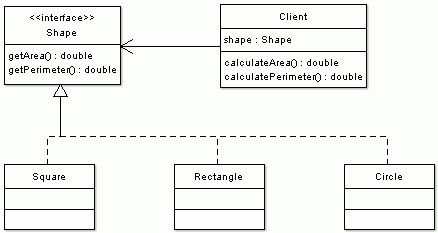
Then we can eliminate the switch statement code smell very easily. We replace it with polymorphism.
Shape.java file
public interface Shape {
 public double getArea();
 public double getPerimeter();
}

Square.java file
public class Square implements Shape {
 private double a;
 ...
 public double getArea() {
     return a * a;
 }
 public double getPerimeter() {
     return 4 * a;
 }
}

Rectangle.java file
public class Rectangle implements Shape {
 private double a;
 private double b;
 ...
 public double getArea() {
     return a * b;
 }
 public double getPerimeter() {
     return 2 * (a + b);
 }
}

Circle.java file
public class Circle implements Shape {
 private double r;
 ...
 public double getArea() {
     return Math.PI * r * r;
 }
 public double getPerimeter() {
     return 2 * Math.PI * r;
 }
}
And such refactoring simplifies the Client code. It also allows for easy extensibility by implementations of other shapes without changing a single line of Client code.
public class Client {
 private Shape shape;
 ...
 public double calculateArea() {
     return shape.getArea();
 }
 public double calculatePerimeter() {
     return shape.getPerimeter();
 }
}
Another way of looking at it is from the responsibility point of view. Why should the client be responsible for calculating the area or the perimeter; or have a knowledge about shape's internals (e.g. number of sides, radius, etc.) It is the responsibility of each shape and all that the client needs to know is that a shape has a perimeter and area.
To sum this all up:
 Whilst in Korea, my cousin Ladislav Babinec took this shot. Both, he and I have a bit of electrical engineering background (he works for a T-Com originally Slovak Telecom). So we were amazed how an electrician would go about fixing this mess. Or maybe they hire only the elecricians with special puzzle solving skills. After this photo had been taken I noticed similar electric poles in many places throughout Seoul. Simply amazing! I wonder what tools do those electricians use for debugging.
I am back from the wonderful trip to South Korea, where my wife comes from. We spent some time sightseeing Seoul and some time meeting with Miae's relatives. I am already looking forward the next time we visit Korea and will travel around the country.
Before one of the meetings we had, I had to go to a restroom. It was in a very luxurious 5-star hotel. As I was sitting there and doing my business I noticed a little white box mounted on the wall. This little device had a display and many buttons. As I can read Korean script (Hangul), but have no idea what I read, I had absolutely no clue what this magic white-box is for. Naturally, I knew there was a connection with the human waste disposal unit I was sitting on.
 What was even worse was the fact the the most common button - FLUSH - was nowhere to be found. I checked the usual spots around the toilet, but I found absolutely nothing. So I decided (as a citizen of a developed country and an educated man) that I have to have a crack on this thing and must be able to flush using basic logic and common sense.
Koreans are probably laughing at me right now, but I failed miserably. I pressed few this-must-work buttons, but could not make that damn thing to flush. So I left with shame, leaving a surprise present for the lucky person who would come after me. Luckily, no one was waiting so I got away with it without too much embarrassment.
This whole story reminds me of an excellent book I read long time ago. The design of Everyday Things by Donald A. Norman talks about the good and bad design of things we use everyday. He says that if things are designed well, no manuals, no labels, no description text is necessary. You simply grab the thing and use it in a right way. How many times you tried to push the door that was meant to be pulled just because the door handle was easier to grab and push? How many times you pushed the wrong light switch because the switches were not in logical order?
Well, I don't know if it was me this time or a bad design. Why do we need so many buttons for the toilet anyway?
Writting a good public API is a very hard job. The API exposes some of the system's functionality and if you plan on releasing your software in the future several times, you better spend a good portion of your time on the design of the public interfaces to your system.
One of the reasons is that you do not want your API to change over time. A single change would make the new release incompatible with the previous ones and all the third-party code that was written and worked well needs to be fixed, before it can work again with your latest shiniest version.
In the past, I worked on a project where I was faced with a custom API. And let me tell you, the interface was far from ideal. Not because it changed over time, but because it was not designed well (or designed at all?) Probably designed by street-side programmers who not only exposed the API via abstract classes that you had to extend (there is this thing called Interface in Java) but also having concrete classes in the method signatures (interfaces anyone?).
For example a method looked like this
public Vector getGetNamesFromContacts(Vector contacts)...So not only you cannot use your collection of choice but you have to use Vector. I ask you, why Vector? We all know how slow they are when compared with unsynchronized lists (e.g. ArrayList). I don't really think that the synchonization was necessary.
 Anyway, imagine that you are given the following abstract class that you can extend. Remember, the API is really bad and you have no access to the Module interface. In fact, there may not even be such an interface. The only thing that is exposed to the outside world is the abstract AbstractModuleImpl class.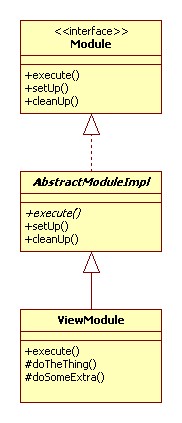
There are three methods in AbstractModuleImpl class: execute(), setUp() and cleanUp(), all are public, execute is also abstract and let's say that their signatures do not really matter at this time.
These methods are given and you can implement them in order to get the set-up before work, actual work and clean-up after work done.
In the next step, we implement our own class. This class is named ViewModule and extends the given abstract AbstractModuleImpl class. As the super class is abstract and our class is concrete (meaning not abstract) we need to implement all methods that were defined as abstract - execute().
We also added and implemented two protected methods doTheThing() and doSomeExtra(). These methods are called from inside execute() method.
 Later we also wanted to implement EditModule class. This class shares 90% of the code similarity with ViewModule. Naturally, that would be best implemented through inheritance. The base class would implement the common methods and then the concrete classes with varied functionality would be implemented as its sub-classes.
I wrote about simplicity of the design in extreme programming in my blog entry Simplicity and XP.
In our case we leave ViewModule as is and extend from it. As you can see from the class diagram EditModule class extends ViewModule class. It overrides execute() and doTheThing() methods. It does not override doSomeExtra() as this method is re-used as is.
Everything looks quite fine, right? But here comes the twist! One of the respected street-side programmers (who does not used Iterators and uses Vectors for everything he codes, just because the other API designed did) in that company told me that this approach would not work. The reason being that it would only work when our implementation class directly extends AbstractModuleImpl. He tried it before, and it did not work. I do not know what he tried, but did not want to qustion his judgement. I just took it as a fact. But still... why would anyone impose such ridiculous limitation on public API?
Anyway I proposed the following design. It was a bit more complicated, worked around the limitation of the API and still reused most of the code.
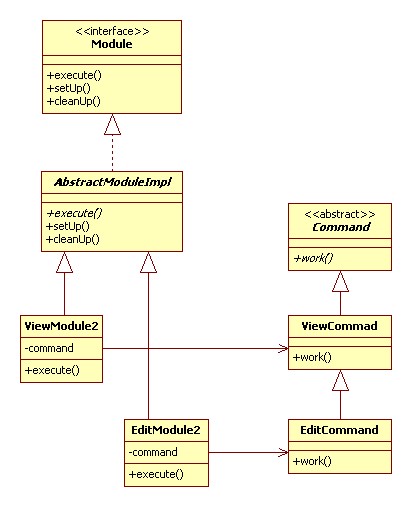
In this case ViewModule2 and EditModule2 share the only similarity, which is they call work() method on their associated command objects.
In this way I could still implement 90% of the common code in ViewCommand class and reuse it in EditCommand class. Also ViewModule2 and EditModule2 classes directly extended AbstractModuleImpl as was required.
Anyway, despite the effort, the code changes were not understood by the street-side programmers (each module should be implemented as one class so it can be delivered stand-alone) and when I returned to work on Monday the code was reverted back to original implementation before my changes and EditModule class was implemented by deadly copy-paste-modify operation (ZERO reusability) based on the code of ViewModule class.


