Showing posts with label best practice. Show all posts

Thursday, July 30, 2009

Detect an AJAX request

Many web applications use AJAX nowadays. In a typical scenario, one fills out a form, which is then submitted to the server. If you don't use AJAX or JavaScript is disabled, your form should still submit with no problems. And you receive a new page. If you use unobtrusive enhancement via JavaScript, the form is submitted to the server and the page is updated with the result without a full page reload.

While developing with Grails writing Java and Groovy code, I noticed that a typical pattern is to create two actions in a controller. One to handle normal HTTP POST (e.g. save action) and one to handle HTTP POST coming from an AJAX request (e.g. saveAjax action). The two actions are almost identical. They perform the same business logic. The only difference is what is returned from each action. A normal action renders a new page. An AJAX one returns whatever your flavor is: XML, JSON, HTML, plain text.

So is there a way to tell the requests (ordinary and AJAX) apart?

You guessed it, there is. AJAX request comes with a special header - X-Requested-With. I usually have my controllers to extend my BaseController, which has a couple of useful methods that I use. isAjax(request) is one of them. And this is what it looks like.


public static boolean isAjax(request) {
return "XMLHttpRequest".equals(request.getHeader("X-Requested-With"));
}

I hope you'll find it useful. The all you need to do in your action is this:


def save = {

// business logic
// ...

if (isAjax(request)) {
render([ /* data */ ] as JSON)
}
else {
// render or redirect here
render(view: 'save', model: [ /* model data */ ])
}
}

Saturday, November 22, 2008

CSS Naming Conventions

This is a great article about CSS coding: semantic approach in naming convention.

I am keeping this link for any time I will start a new project and will need to look back at some good advise for CSS naming conventions.

Surprisingly I was not far off with my currently undergoing project bar sorrento.

An image is worth a thousand words.

Nevertheless, I recommend you read the full story.

Monday, November 17, 2008

Grails and 404 Page Not Found

Every good website should have a nice 404 page. This is the page that is displayed when your customers or clients navigate to a destination that does not exist, by typing an invalid URL.

Grails does not give you a nice implementation of 404 error (or any other than 500 error). You need to implement it yourself.

If you search the Internet for examples of how to implement 404 Page Not Found error in Grails, most of the results talk about the following scenario:

class UrlMappings {
static mappings = {
"500"(controller:"errors", action:"serverError")
"404"(controller:"errors", action:"notFound")
"403"(controller:"errors", action:"forbidden")
}
}

The previous piece of declaration resides inside UrlMappings.groovy and what it means is that if an error occurs, the request is redirected to errors controller which will execute in case of 404 the notFound action. This action could be as simple as

def notFound = {
render(view:"/notFound")
}

This is all good, but if it is all you need to do (render a view - notFound.gsp) you may as well express it declaratively inside UrlMappings.groovy

class UrlMappings {
static mappings = {
"500"(view:'/error')
"404"(view:'/notFound')
"403"(view:'/forbidden')
}
}

This way you won't need a controller class at all. All you need are GSP files in the locations declared in the mappings.

References

Sunday, November 09, 2008

hCard microformat validator

I was creating a contact page for a website and I wanted to use hCard microformat to encode the address, telephone, fax and the geo location. After I created it, I looked for a way to quickly validate it and I found

hCard microformat Validator 1.0

What a great service! I must tell you, this service is super easy to use. Just type in a URL of the page that contains hCard data and get the results instantly. I read the spec but... I still made few mistakes that were promptly brought to my attention.

I made a typo and instead of adr I used addr, which rendered couple of nested elements invalid. Ok, that was a quick fix.

The telephone number is shop's (this website is for a retail store) and I marked the telephone number as shop, which is invalid. The valid values are: home, work, pref, fax, cell, voice, video, pager, car, msg, modem, bbs, isdn, pcs. Another easy fix! The same went for the fax number.

Lastly, the email address that I entered was of a domain that did not register itself yet. The message I got was:

Lookup of e-mail's domain “notyetregistered.com.au” failedVerify that e-mail address is correct.

Wow, I did not expect such a thorough check!

Another good point for this validator is that it not only tells you what is wrong, but it also links to a FAQ page where the problem is explained.

Well done and thank you! Now this contact page validates 100%!

Saturday, October 11, 2008

HTML id attribute valid values

Many (if not all) HTML tags can have id attribute. This attribute uniquely identifies the tag on a single HTML page. Web designers use ids when they design the page using CSS. Web developers use ids for retrieving DOM objects via JavaScript or functional testing of their sites.

Despite the wide use of id attribute, many of us get it wrong, the value of the id tag attribute to be precise.

According to the HTML 4.0 specification for basic types:

ID and NAME tokens must begin with a letter ([A-Za-z]) and may be followed by any number of letters, digits ([0-9]), hyphens ("-"), underscores ("_"), colons (":"), and periods (".").

This is a very basic rule and yet many of us get it wrong, not on purpose of course.

The most common mistake come with web applications that display data from a database. Most commonly a database record is uniquely identified in the database by a record id. This is number that is unique per database table. The common mistake is to use this (database) id as a value of the id attribute on a HTML page. The problem is that the database id is a number, but HTML ids cannot start with a digit. Remember HTML ids must start with a letter A-Z or a-z. Therefore the database id needs to be pre-pended with at least a single letter.

Even worse, I have seen web applications to use entity names as ids. These names are semi-unique, but may contain international characters, characters outside of A-Z and a-z range and even spaces.

If you are going to use a prefix before the database id and you want to separate the two, I strongly advise you to use underscore ("_"). My reasons are the following:

Don't use spaces (" ")! The reason for this is simple. Space character is not a valid for id or name attribute.

Don't use hyphens ("-")! If you intend to use an id with JavaScript in the form document.idname.value, you must use a name that is a valid JavaScript variable name. Hyphen (or minus) would break the JavaScript on your page.

Don't use colons (":") or periods (".")! These characters are valid, however if you decide to use CSS or some JavaScript library that uses CSS-like selectors (e.g. jQuery), periods will be mistaken for CSS class selectors and colons for pseudo-class selectors (e.g. :hover for links).

For the geeky ones, it is possible to start an id with a number (if you really want to) but you need to represent this number with its Unicode escaped character.

Friday, September 05, 2008

Process terminated with exit code 3

This is a reminder to myself.

I had a trouble with IntelliJ IDEA today. It was the same as I had some time ago on a different computer.

Process terminated with exit code 3


After a bit of digging around the solution was obvious: increase the maximum heap size in Settings | Compiler.

Sunday, August 31, 2008

How to get the server's timezone

The problem

How to get the server's timezone display name correctly and display it to the user in his locale.

server's default timezone

Firstly, you need to get the server's default timezone. This is easily achieved by the following call

final TimeZone timeZone = TimeZone.getDefault();

use daylight time?

Secondly, you need to find out if this timezone uses daylight time. This is important as some timezones change their names during daylight saving. Don't use the TimeZone.useDaylightTime() method

//final boolean daylight = timeZone.useDaylightTime();

This method works fine only for systems where the timezone never changes. If the administrator changes the time on the server, this change won't be reflected in subsequent calls. What you need to do instead, is to find out is the daylight savings is on right now.

final boolean daylight = timeZone.inDaylightTime(new Date());

user's locale

The last important step is to get the right locale, the locale you want this timezone name to display in. You could call Locale.getDefault(), but this returns server's default locale. You want the locale that the user is using. In a web application, the user's locale can be obtained from getLocale() method of ServletRequest object.

final Locale locale = servletRequest.getLocale();

final step - timezone display name

Now we can call getDisplayName method with all required parameters.

return timeZone.getDisplayName(daylight, TimeZone.LONG, locale);

Solution

To put this all together, the final solution may look like this method

private String getServerTimeZoneDisplayName()
{
final TimeZone timeZone = TimeZone.getDefault();
final boolean daylight = timeZone.inDaylightTime(new Date());
final Locale locale = servletRequest.getLocale();
return timeZone.getDisplayName(daylight, TimeZone.LONG, locale);
}

References

Thursday, August 16, 2007

Keep it simple

Recently I saw pieces of code that could be simplified. I see such code often, however, recently I came across code that seemed to follow the same pattern

The patern was as in the following example:


private boolean someFlag;

...

public boolean isSomeFlagSet() {
if (someFlag) {
return true;
}
else {
return false;
}
}

Why not simply write:


public boolean isSomeFlagSet() {
return someFlag;
}

It is so much simpler!

Similarly to boolean flags, there where occurencies of other object types being used and methods invoked on them in the following manner:


public String getCity() {
if (address == null) {
return null;
}
else {
return address.getCity();
}
}

This can be also simplified (applying "change if-else to ?:" refactoring) to:


public String getCity() {
return address == null ? null : address.getCity();
}

Please strive for simplicity in your code (K.I.S.S. principle). Verbosity clutters the code and can hide the meaning or intention of it.

Sunday, April 22, 2007

People still don't get String comparison

How many times we have seen String comparison done using == or != operators?! Yet, people still get it wrong.

I have seen some blog posts recently where the authors had a good intention to show a case where hard-coding values went wrong. Unfortunately, they fell into the common mistake of comparison of String references.

So, if you really need to compare two String using == or != make sure you call String.intern() method before making comparison. Otherwise, always prefer String.equals(String) for String comparison.

Fail-fast vs. complete validation

Almost all applications work with data that come from the interaction with humans or other applications. These data, however, may not necessarily meet the requirements of the accepting applications. Data must be validated.

What is validation?

Data entered must pass a set of validation rules in order to be recognized as valid and allowed for further processing.

As an example, lets take a class that has three members: name:String, created:Date and total:int. Our application requires that name is set (not null) and has at least three characters; created is also required and must be a date representing time before now; and total must be a non-negative integer.

There are two common approaches to data validation: fail-fast validation and complete validation.

Fail-fast validation

How it works

If any of the validation rules fails, validation is stopped and data is pronounced invalid and rejected for further processing.

Output

Boolean result that indicates the validity of input data: true for valid, false for invalid.

Pros

It is generally faster than complete validation as first failure terminates the execution of consecutive validation rules. Does not have the over of failure cause reporting.

Cons

Does not provide enough information about the cause of failure.

When to use it

If a simple result: true or false is enough; detailed information about the cause of failure is not required. May be suitable for cases when the source of data cannot correct the data (usually a system without human input).

Example

boolean isValid(String name, Date created, int total)

Data is passed in and boolean result is returned.

Complete validation

How it works

Failure of a validation rule does not stop the validation process. Data is marked as invalid and rejected for further processing after completing whole validation process.

Output

Boolean result that indicates the validity of input data: true for valid, false for invalid. Some form of error collection that contains the information about the causes of validation failure.

For examples see ActionMessages class from Struts framework, Errors class from Spring framework or ErrorCollection class in Atlassian JIRA.

Pros

Provides information about the cause or causes of validation failure. This information can provide the necessary feedback for correcting the input data.

Cons

Slower than fail-fast validation as extra information about causes of validation failure are reported and full set of validation rules is executed independently on the validation result.

When to use it

When a complete set of failure causes is required. The causes of failure may provide hints to the user entering the data about how to correct the data.

Example

void validate(String name, Date created, int total, ErrorCollection errorCollection)

Data is passed in along with the error collection. Method does not have to return anything (void) as invalid data is indicated by the presence of errors in the error collection.

Conclusion

If the complex validation rule set can be broken down into separate validations per input field, these can be used in order to enhance the user experience (via JavaScript or AJAX) – they can provide a real-time feedback for the data being entered.

Also consider that some cases can involve several other input values in order to make a decision about validity of input data. Such case can for example be a single date value consisting on the values from three input fields (don't do this, it's not a really good way of entering dates)

or conditionally required fields, such as the text area in the next picture is only required to be filled in if "other" is selected.

Both types of validation serve their purpose. Which one you decide to use depends mostly on how much information about data being validated you really need in order to make a decision or to correct it in case of failure.

Tuesday, March 20, 2007

Managing User Expectations

One of the last chapters of The Pragmatic Programmer: From Journeyman to Master book that I finished reading today is titled "Great Expectations".

This chapter talks about communicating expectations to the users and suggests to gently exceed users' expectations in order to keep them happy using your software.

I must say that I agree with this book in many points except "The Extra Mile":

If you work closely with your users, sharing their expectations and communicating what you're doing, then there will be few surprises when the project gets delivered.

This is a BAD THING. Try to surprise your users. Not scare them, mind you, but delight them.

Did I miss something here? I understand that a good surprise may pay off, but who knows? It may not be so good after all. Only customers will tell if the "surprise feature" is good.

Maybe I'm too pragmatic (more pragmatic than the pragmatic programmer), but I would feel better to have a happy customer with less surprises. However, the marketing guys may have a different opinion...

What is your opinion? Do you give your users little surprises to delight them? If so, I'd like to hear from you.

Tuesday, February 27, 2007

toString() and primitive values

How can one convert a primitive value such as integer or boolean to String object?

Well, there are many ways. There is one way that I have seen so many times:

String strValue = new Integer(intValue).toString();

or

String strValue = new Boolean(booleanValue).toString();

Similarly new instance can be created and the toString() method invoked on classes such as Integer, Long, Float, Double, Byte, Short and Boolean.

The problem is that a boxed primitive is allocated just to call toString() method on it. Each time this is executed, a new instance, new object is created. However, object creation is not necessary and can be avoided. Creating object just for one method call is highly inefficient as the object can be garbage collected on the consecutive line.

The solution

It is more efficient to use the static form of toString() method, which takes the primitive value as a parameter.

String strValue = Integer.toString(intValue);

or

String strValue = Boolean.toString(booleanValue);

Side note

...and please don't do the following

Integer number = ...
String strValue = Integer.toString(number.intValue());

If you already have an instance of integer wrapper class, simply call

String strValue = number.toString();

Sunday, December 17, 2006

Recursion vs. Loop

Problem

Imagine that your application is meant to process an XML file. It is given a tag and needs to find a "special tag" that this tag might be nested in. This problem has several solutions. I tackled a similar problem some time ago and I will present you with some of the solutions that I considered.

While loop

private SpecialTag findSpecialTag()
{
Tag parent = this.getParentTag();
while (parent != null && !(parent instanceof SpecialTag))
{
parent = parent.getParentTag();
}
return (SpecialTag) parent;
}

Do-while loop

private SpecialTag findSpecialTag()
{
Tag parent = this;
do
{
parent = parent.getParentTag();
}
while (parent != null && !(parent instanceof SpecialTag));
return (SpecialTag) parent;
}

Recursion

private SpecialTag findSpecialTag()
{
return findSpecialTag(this.getParentTag());
}

private SpecialTag findSpecialTag(Tag tag)
{
if (tag == null || tag instanceof SpecialTag)
{
return (SpecialTag) tag;
}
else
{
return findSpecialTag(tag.getParentTag());
}
}

Solution

In my personal opinion, I find the while loop cleanest and simplest to understand. Do-while loop gets a bit messy with the condition at the end and recursion is probably the worst. I find recursion a bit hard to follow. It can also introduce an extra method just for its own sake (as in this example).

I do not have a strong opinion on this topic. If you like to program recursions, while loops, do-while loops, or for loops, it's fine by me. I certainly will not change your code, but if you ask me to write some code, it'd most likely be a while (or for) loop.

I use while and for loops interchangeably. The previous example with while loop would look like this with for loop:

private SpecialTag findSpecialTag()
{
Tag p = this.getParentTag();
for(; p != null && !(p instanceof SpecialTag); p = p.getParentTag());
return (SpecialTag) parent;
}

What is your preference?

Wednesday, September 27, 2006

First element in the List

Imagine this scenario. You are working on an existing application. There is a framework used. One of the benefits that this framework gives you is retrieving and processing parameters coming from the client, let's say a web application. The framework gives you all parameters as a List. Now in this particular case you always get only one parameter, but is it enclosed in the List. How do you get it out efficiently?

The intended method would be described: Get the list of parameters and if not empty, return first element in the list otherwise return null. The code was looked similar to this:

1 public E getSingleParam(List params) {
2 E param = null;
3 if (params != null && params.size() >= 1) {
4 param = params.iterator().next();
5 }
6 }

This code works fine but it has several points for improvement. First is how the code at line 3 expresses the intention of check whether the list of parameters is not null and not empty, specifically the later. List interface defines boolean isEmpty() method that is in most cases more efficient to run than getting the size and comparing it to 0 (greater than) or 1 (grater than or equal). That is if the list implements an internal flag for its "emptiness" state or has an internal counter as opposed to re-counting its elements. In the worst case scenario the efficiency will be the same as getting the size and comparing it with 0. In that case isEmpty() method is still a nice convenience method to call and should be preferred before the size() > 0 alternative. Another reason is that it speaks for itself. All we need to know is whether there are any elements in the list or not. Getting the size should be used to for other purposes (e.g. calculating the width of the table column when displaying the results in a tabular form – 100% / size()).

1 public E getSingleParam(List params) {
2 E param = null;
3 if (params != null && !params.isEmpty()) {
4 param = params.iterator().next();
5 }
6 }

The second point of making the code to perform better and to make it easier to read is the line 4. On this line we are getting the first element of the list. As shown in the example above, this is an inefficient way as we construct an Iterator only for the purpose of one iteration. Constructing new objects and disposing of them is usually expensive and should be avoided. A better way is to access the element directly, such as:

1 public E getSingleParam(List params) {
2 E param = null;
3 if (params != null && !params.isEmpty()) {
4 param = params.get(0);
5 }
6 }

This way no new objects are constructed (no Iterator). Another difference between the two is the exception that could be possibly thrown. The exception would be thrown if we did not have the previous check or in the case of concurrent modification of the list which is very unlikely in this case. The exception thrown in first case would be a NoSuchElementException. In the second way, an IndexOutOfBoundsException would be thrown. Both of them are runtime exceptions and do not have to be declared. In this case getting one exception or the other should not make any difference.

Friday, June 16, 2006

Pair Programming and Office Environment

Everyday I come to the office and I see people working. We all work in different ways. Sometimes we work by ourselves, sometimes we pair up to work together on a card we pick from the wall (card = task from the story board). These two ways of working are very different and I would like to share my thoughts on them with you.

Caves

People need privacy. They need to take or make phone calls or do some other things without disturbing others in the office. They also need to have a "home base", where they can keep their belongings. Such places could be small offices or cubicles.

Caves are also great for pairs whose task is to investigate something that none of the developers in that pair have experience with. This way some new things can be explored in a much more efficient way and different approaches can produce various results. These can be later discussed and a common solutions can be found. If the pair worked on one PC, the productivity would be only slightly better than of one developer working alone.

Commons

When it comes to pairing, people typically use their "personal spaces" or designated spaces, such as pairing desks or pairing rooms. There are two roles in each pair. The driver is the person who is in control of the keyboard and mouse at that moment. The other person is usually called the navigator.

In the case of the personal spaces, each desk must not limit the access to the PC. What I mean by that, is that the desk is best to be straight. Corner desks do not allow the developers to sit next to each other. Then it looks like the navigator is breathing down the driver’s neck and has very limited visibility of the screen. So, the "cave" is unsuitable for this task.

There are several variations of the pairing desk set-up. Let's talk about them in more detail.

One PC, one screen, one mouse, one keyboard

In this configuration, there is only one screen, so the settings must be so the navigator has as good visibility of the screen as the driver. Otherwise the navigator can not contribute much and the productivity of the pair is impaired. The navigator has no active control of what is happening. The only way the navigator can influence the process is by telling or suggesting to the driver. The limitation of having just one keyboard and mouse typically results in "switching" roles. When the navigator decides to drive, the control is passed onto him/her obviously by handing of the keyboard and mouse. Therefore everyone in the office can see who has what role in each pair at that given moment.

The usual way the developers drive is that they share a larger space in front of the screen. Ideally the developers should sit side by side and share the same (50%) of the screen space. This can only be achieved by having large and/or widescreen monitors (21 inch or larger). See the images below to see how large screen can work for a pair.

For the smaller screens the percentage the driver occupies is related to the size of the screen. For the 19 inch monitors it is approximately 60%. As the roles switch the developers shift to take or give space as shown on the images below.

One PC, one screen, one keyboard, two mice
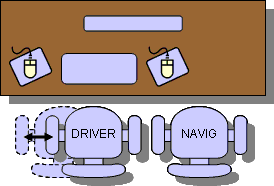
A step up is to have two mice. Having USB mice is great. Just plug one more mouse into your PC and voilà. You are good to go. The OS should recognize both mice and you should be able to use them. Unfortunately, there is only one mouse pointer on the screen, so you have to fight for it. (Well, at least I did not find a good software that would allow you to have two separate mouse pointers.

Having two mice has a significant benefit. The navigator does not need to be told: "DON'T TOUCH MY SCREEN" when pointing at something on the screen. A mouse can be used for that. Moreover, the mouse is a powerful tool these days. There is so much you can get done with just a click.
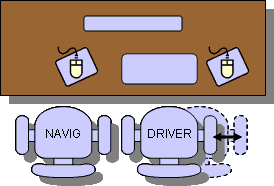
Alright, so we have two mice, how do we switch roles. It's almost the same as before. The keyboard gets passed around. This setup usually results in the navigator sitting on the left and having the control over the spare mouse. The driver typically sits on the right having the control over the keyboard and the mouse. When the roles changes, as displayed below, the driver who becomes the navigator (on the right) loses the control and because there is no extra mouse on the right the navigator is quite passive (same as in the configuration with one keyboard and one mouse only).

The only solution to the right-side navigator's passivity would be an extra mouse on the right. It can work, I have never tried it and personally, it's just too many rodents on one's desk.

One PC, one screen, two keyboards, two mice
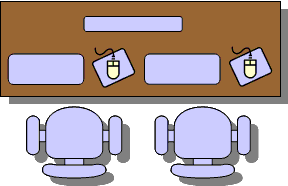
This is another step up for a better working configuration. In this case another keyboard is added to the PC. Each developer has his/her keyboard and mouse combo. In this way the developers can very effectively switch roles, almost instantly a navigator can jump in and drive for a few moments and then give the control back to the driver.

If your company can not afford to have spare sets of input devices, just bring your own to the pairing desk. All of us have the PCs, the keyboards and the mice, right? So, just unplug them from your PC and bring them to the pairing PC. Ideally, you would not have to do this. There should be some spare sets. The best results are if these are wireless as they tend to clutter the desk less and are easily portable. The only problem that can arise is that their frequencies may start to interfere, so wired ones might prove the best.

One PC, two screens, two keyboards, two mice
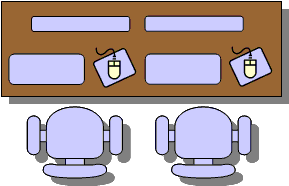
This is an ideal configuration and if you have it, you can call yourself lucky. There are not many companies that I know of that would provide their developer with such luxury. In our company we have several pairing rooms equipped with fast PCs and dual 21 inch screens with two sets of keyboards and mice.

This configuration is not only ideal from a driving point of view, but as a navigator you have a full view of the screen. Sometimes you might feel that when you are the navigator the machine is doing your work (that is if you ignore that dude on your side, but be nice to him as he might feel the same when you drive.)

Alternatively, the real estate of the two large screens can be used more efficiently by splitting the desktop. This can be done by stretching the desktop the way the one half is of one screen and the second half is on the other screen. This is useful most typically in cases when you need one window with source code and another window for testing the application (web browser for web applications.)

Laptops and pair programming

Laptops are nice little useful things. I love them. But they are not ideal for pair programming. Well, unless some special setup is done.

Read more about why the laptops are no good for pair programming.

What can we do? How can we be pair programming and using laptops at the same time?

The answer is not that difficult. All you need to accommodate the second developer is a screen, a keyboard and a mouse. Have you heard about USB? Get a USB keyboard and a mouse, and you are set. Well almost. The second developer needs to see as well. Give him/her a screen. Laptops have video outputs these days. It should be no problem to plug in additional monitor. The only

trouble might be setting up the resolution so it fits the laptop's screen as well as additional monitor's.

Alternatively you could configure the desktop to be stretched onto the second screen and this way you can use more real-estate as long as you maintain good visibility of both screens for both of you.

Office layout

So far, we have talked about the desk configuration. But what about how the desks should be organized in the office?

There are two factors to consider. Noise and communication. The communication is important not only within the pair, but also inter-pair. It is most beneficial if you can communicate quickly and when needed. The layout of the desks in the office should allow you to see and talk to other pairs easily. The layout documented in many XP books and articles describes the setting of six desks as on the picture below.
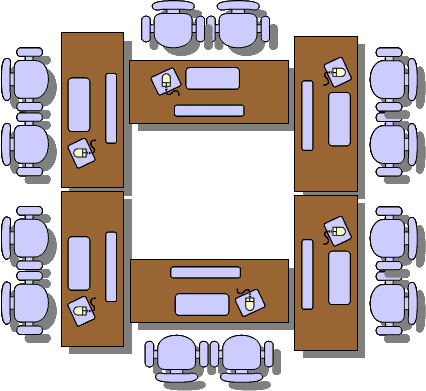
If you have enough space in the center of the room, this setup can work the best. The pairs can see each other and can talk to each other without shouting across the room. They also have a semi-private space where the pairs can work without generating too much noise disturbing the others.

These desks should be big enough to easily accommodate both developers, equipped with fast PCs and two sets of keyboards and mice. These should belong to the common area, they should not be personal caves of anyone.

We do not have this setup. We have pairing rooms that are well equipped, but they are rooms. And as such they isolate the pair from other pairs. The downside of it is that the developers very rarely communicate between pairs outside the meetings (formal or informal) when outside of the pairing rooms. Not all developers get to use these rooms. Simply, it's just too many of us and too few rooms. So we use our personal spaces for pairing as well. Neither our desks are located in the middle of room. The are lined-up along the walls and windows around the office. And so on some occasions there are big gaps between us and we have to walk across the room to talk to our peers.

No matter what the layout of the desks in your office is, try to respect the solo developers who require a quiet atmosphere for their thought flow. Pairs generate more office noise but can also effectively block out the noise generated by others. Solo programmers can not (unless they have earplugs and some loud music). Ideally, the pairs could be in a separate room from the personal spaces where we all work alone.

Monday, June 12, 2006

Code Conventions

Brandon Franklin recently asked the following question on AJUG (Australian Java Users Group) and SeaJUG (Seattle Java Users Group):

At your company, are the { } placed using the Sun Standard, like this:

public void method() {
}

or using the "C way", like this:

public void method()
{
}

A day later, he posted the results of his survey back to these mailing lists. There were 68 responses: 35 from AJUG and 33 from SeaJUG. Basically there were three types of responses: same line opening bracket, next line opening bracket, and "either" or "no standard". And here is how each type was in favour:

          SAME LINE     NEXT LINE/ALIGNED      EITHER
AJUG 60% 37% 3%
SeaJUG 58% 33% 9%
COMBINED 59% 35% 6%

The conclusion that Brandon came to was that the majority of Java development houses seem to use the Sun standard, with a solid third still using the "next line braces" approach.

I am not going to say which one you should choose. In my experience, the majority of companies I worked for used same line style. In fact, all of them, but one used it. So the ratio in my case would be 4:1 for same line style. When it comes to number of projects I worked on, it gets better (or worse, depending on how you look at it). The per projects ratio would be (and that's only because I can not remember all the small and small-ish projects I worked on) somewhere around 9:1.

Brandon also said that It was not uncommon, in both camps, to have a person saying "While I support X, my company forces me to use Y."

And he also has the following message, which I completely agree with:

Those of you who support the Sun Standard but who are forced to use the "C way" at work, I encourage you to take these results to your team and use them to strengthen your argument that the company is not following the majority of the industry in their code formatting. Those of you who are using the "C way", I would ask that you reconsider your stance in light of this information, and consider the value of industry standards above "personal preference".

But don't get me wrong! I do not mind using either style. After all, it's just a style, the real value is the code.

If you have a smart IDE then you can "see" the code through your prefered style without messing up the code that is in the common repository (and may be see in some other ways by others).

Which camp are you in?

Read more about Sun's official Code Conventions for the Java Programming Language.

Sunday, May 14, 2006

Bad API and worse coding practices

Writting a good public API is a very hard job. The API exposes some of the system's functionality and if you plan on releasing your software in the future several times, you better spend a good portion of your time on the design of the public interfaces to your system.

One of the reasons is that you do not want your API to change over time. A single change would make the new release incompatible with the previous ones and all the third-party code that was written and worked well needs to be fixed, before it can work again with your latest shiniest version.

In the past, I worked on a project where I was faced with a custom API. And let me tell you, the interface was far from ideal. Not because it changed over time, but because it was not designed well (or designed at all?) Probably designed by street-side programmers who not only exposed the API via abstract classes that you had to extend (there is this thing called Interface in Java) but also having concrete classes in the method signatures (interfaces anyone?).

For example a method looked like this

public Vector getGetNamesFromContacts(Vector contacts)...

So not only you cannot use your collection of choice but you have to use Vector. I ask you, why Vector? We all know how slow they are when compared with unsynchronized lists (e.g. ArrayList). I don't really think that the synchonization was necessary.

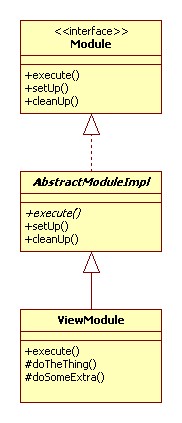
Anyway, imagine that you are given the following abstract class that you can extend. Remember, the API is really bad and you have no access to the Module interface. In fact, there may not even be such an interface. The only thing that is exposed to the outside world is the abstract AbstractModuleImpl class.

There are three methods in AbstractModuleImpl class: execute(), setUp() and cleanUp(), all are public, execute is also abstract and let's say that their signatures do not really matter at this time.

These methods are given and you can implement them in order to get the set-up before work, actual work and clean-up after work done.

In the next step, we implement our own class. This class is named ViewModule and extends the given abstract AbstractModuleImpl class. As the super class is abstract and our class is concrete (meaning not abstract) we need to implement all methods that were defined as abstract - execute().

We also added and implemented two protected methods doTheThing() and doSomeExtra(). These methods are called from inside execute() method.

Later we also wanted to implement EditModule class. This class shares 90% of the code similarity with ViewModule. Naturally, that would be best implemented through inheritance. The base class would implement the common methods and then the concrete classes with varied functionality would be implemented as its sub-classes.

I wrote about simplicity of the design in extreme programming in my blog entry Simplicity and XP.

In our case we leave ViewModule as is and extend from it. As you can see from the class diagram EditModule class extends ViewModule class. It overrides execute() and doTheThing() methods. It does not override doSomeExtra() as this method is re-used as is.

Everything looks quite fine, right? But here comes the twist! One of the respected street-side programmers (who does not used Iterators and uses Vectors for everything he codes, just because the other API designed did) in that company told me that this approach would not work. The reason being that it would only work when our implementation class directly extends AbstractModuleImpl. He tried it before, and it did not work. I do not know what he tried, but did not want to qustion his judgement. I just took it as a fact. But still... why would anyone impose such ridiculous limitation on public API?

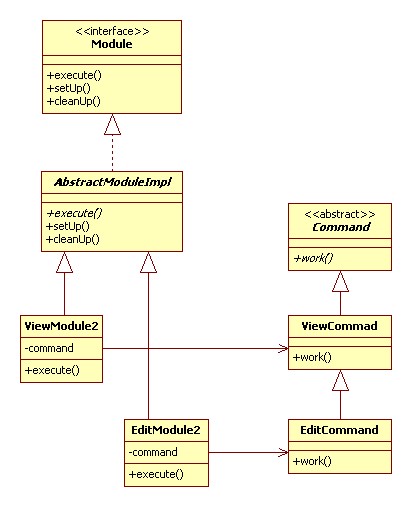
Anyway I proposed the following design. It was a bit more complicated, worked around the limitation of the API and still reused most of the code.

In this case ViewModule2 and EditModule2 share the only similarity, which is they call work() method on their associated command objects.

In this way I could still implement 90% of the common code in ViewCommand class and reuse it in EditCommand class. Also ViewModule2 and EditModule2 classes directly extended AbstractModuleImpl as was required.

Anyway, despite the effort, the code changes were not understood by the street-side programmers (each module should be implemented as one class so it can be delivered stand-alone) and when I returned to work on Monday the code was reverted back to original implementation before my changes and EditModule class was implemented by deadly copy-paste-modify operation (ZERO reusability) based on the code of ViewModule class.

Monday, May 01, 2006

Working on Tasks in XP

After we get the stories from the customer, the stories are broken down to tasks, the tasks are estimated. What happens next? Well, there are two ways to go about tasks during each iteration:

  1. Do tasks one at the time,
  2. Fill your bag.

One at the time

Description:
The developers pick up the task they would like to tackle. Then they work on it until it is done, then they take another task.

Advantages:
It does not create bottlenecks. When the task is finished, you take another one. If some pair gets stuck on one, the other tasks can still be going well. This approach also makes the pair focus on one task at the time.

Disadvantages:
The task estimate is a subject to change when somebody signs up for the task.

Fill your bag

Description:
Every pair signs up for tasks until their bag for the iteration is full. The tasks are assigned by some kind of auction where developers take ownership and estimate their tasks. It is usually those who took the story and broke it down into tasks.

Advantages:
The customer can have a better idea what will get done in the iteration and by whom. Developers can also have a sense of progress and a better sense of how all tasks fit into the story.

Disadvantages:
It can create a bottleneck. Some developers might get stuck on a task or can spend more time on it.

Friday, March 17, 2006

To Boolean or not to Boolean

There is no reason to create new Boolean object. In 99.99% cases we are only interested in using a Boolean object that holds either true or false value. The only case where we might need to create a new instance is for instance comparison rather then value comparison (equals()), e.g.

new Boolean(true) == new Boolean(true)

Java Boolean class comes with two constants that will do the job: Boolean.TRUE and Boolean.FALSE.

private Boolean isNegative(int i) {
return new Boolean(i < 0);
}

Better way:

private Boolean isNegative(int i) {
return i < 0 ? Boolean.TRUE : Boolean.FALSE;
}

This might be trivial, but can significantly improve performance. Creating new objects is an expensive operation and it also consumes more memory that must be allocated to these objects and then potentially garbage collected.

Second issue that can potentially rise with using Boolean class is how to convert a String value to boolean. Boolean class offers two methods that accept String as a parameter:

  • static boolean getBoolean(String)

  • static Boolean valueOf(String)

Which one to use?

The JavaDoc for the later states: Returns a Boolean with a value represented by the specified String. The Boolean returned represents the value true if the string argument is not null and is equal, ignoring case, to the string "true".

The JavaDoc for getBoolean(String)states: Returns true if and only if the system property named by the argument exists and is equal to the string "true". (Beginning with version 1.0.2 of the JavaTM platform, the test of this string is case insensitive.) A system property is accessible through getProperty, a method defined by the System class. If there is no property with the specified name, or if the specified name is empty or null, then false is returned.

People tend to forget this from time to time and tend to use getBoolean(String), especially when require a boolean primitive as outcome. Fortunately, with good tests in place this is discovered and fixed in early development stages.

Therefore use getBoolean(String) only if you need to read system property value as a boolean. For String conversion always use valueOf(String)

String valid = getValidity(); // implemented elsewhere
boolean isValid = Boolean.valueOf(valid).booleanValue();

Any questions? Boolean.FALSE

Tuesday, March 14, 2006

How useful is String(String) constructor?

Good architectural design is essential. We can not expect junior programmers to know all APIs well. With good design good programming practices can be enforced and unintentional mistakes avoided. Architect’s and designer’s responsibility is to create a framework of interfaces, abstract classes, utility classes that other developers will use or implement.

Recently I came across this line

String value = new String(“some text”);

I have not seen String(String) constructor for a long while. Have you seen it recently? Probably not. And there is a good reason for it. For 99.9% of cases you won’t need it at all. It only serves as a copy constructor that takes a String as an argument and creates a new instance that represents the same string of characters. Further more first string created (“some text”) is ready for garbage collection on the very next line. It would only be useful if you were to compare the two strings as

someString == someOtherString

Generally, when I see such comparison it is a programming bug. In most of the cases the equals() method is used for String comparison.

someString.equals(someOtherString)

But that is another story. Anyway, back to String(String) constructor. Having this constructor may lead to unintentional object instance creation. When you create a String by putting anything between double quotes you already have an instance. There is no need to call new String(String). The following line will perfectly do the job.

String value = "some text";

I understand that the designers’ intention was to have a String copy constructor, but in this case, I do not believe, it was a wise step. A factory method would have been better. It could be called createNewInstance(String) or copy(String).

Good design is essential. But good design is not bullet proof. We still need to know the APIs, frameworks and things such as immutability of String objects.


Creative Commons License This work is licensed under a Creative Commons Attribution-NonCommercial-ShareAlike 2.5 License.