Everyday I come to the office and I see people working. We all work in different ways. Sometimes we work by ourselves, sometimes we pair up to work together on a card we pick from the wall (card = task from the story board). These two ways of working are very different and I would like to share my thoughts on them with you.
Caves
People need privacy. They need to take or make phone calls or do some other things without disturbing others in the office. They also need to have a "home base", where they can keep their belongings. Such places could be small offices or cubicles.
Caves are also great for pairs whose task is to investigate something that none of the developers in that pair have experience with. This way some new things can be explored in a much more efficient way and different approaches can produce various results. These can be later discussed and a common solutions can be found. If the pair worked on one PC, the productivity would be only slightly better than of one developer working alone.
Commons
When it comes to pairing, people typically use their "personal spaces" or designated spaces, such as pairing desks or pairing rooms. There are two roles in each pair. The driver is the person who is in control of the keyboard and mouse at that moment. The other person is usually called the navigator.
In the case of the personal spaces, each desk must not limit the access to the PC. What I mean by that, is that the desk is best to be straight. Corner desks do not allow the developers to sit next to each other. Then it looks like the navigator is breathing down the driver’s neck and has very limited visibility of the screen. So, the "cave" is unsuitable for this task.
There are several variations of the pairing desk set-up. Let's talk about them in more detail.
One PC, one screen, one mouse, one keyboard
 In this configuration, there is only one screen, so the settings must be so the navigator has as good visibility of the screen as the driver. Otherwise the navigator can not contribute much and the productivity of the pair is impaired. The navigator has no active control of what is happening. The only way the navigator can influence the process is by telling or suggesting to the driver. The limitation of having just one keyboard and mouse typically results in "switching" roles. When the navigator decides to drive, the control is passed onto him/her obviously by handing of the keyboard and mouse. Therefore everyone in the office can see who has what role in each pair at that given moment.
The usual way the developers drive is that they share a larger space in front of the screen. Ideally the developers should sit side by side and share the same (50%) of the screen space. This can only be achieved by having large and/or widescreen monitors (21 inch or larger). See the images below to see how large screen can work for a pair.
For the smaller screens the percentage the driver occupies is related to the size of the screen. For the 19 inch monitors it is approximately 60%. As the roles switch the developers shift to take or give space as shown on the images below.
One PC, one screen, one keyboard, two mice
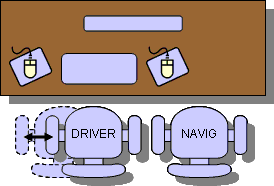 A step up is to have two mice. Having USB mice is great. Just plug one more mouse into your PC and voilà. You are good to go. The OS should recognize both mice and you should be able to use them. Unfortunately, there is only one mouse pointer on the screen, so you have to fight for it. (Well, at least I did not find a good software that would allow you to have two separate mouse pointers.
Having two mice has a significant benefit. The navigator does not need to be told: "DON'T TOUCH MY SCREEN" when pointing at something on the screen. A mouse can be used for that. Moreover, the mouse is a powerful tool these days. There is so much you can get done with just a click.
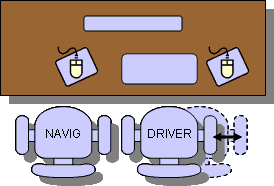 Alright, so we have two mice, how do we switch roles. It's almost the same as before. The keyboard gets passed around. This setup usually results in the navigator sitting on the left and having the control over the spare mouse. The driver typically sits on the right having the control over the keyboard and the mouse. When the roles changes, as displayed below, the driver who becomes the navigator (on the right) loses the control and because there is no extra mouse on the right the navigator is quite passive (same as in the configuration with one keyboard and one mouse only).
The only solution to the right-side navigator's passivity would be an extra mouse on the right. It can work, I have never tried it and personally, it's just too many rodents on one's desk.
One PC, one screen, two keyboards, two mice
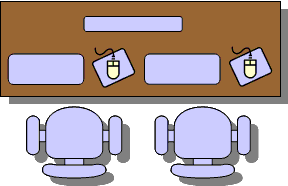 This is another step up for a better working configuration. In this case another keyboard is added to the PC. Each developer has his/her keyboard and mouse combo. In this way the developers can very effectively switch roles, almost instantly a navigator can jump in and drive for a few moments and then give the control back to the driver.
If your company can not afford to have spare sets of input devices, just bring your own to the pairing desk. All of us have the PCs, the keyboards and the mice, right? So, just unplug them from your PC and bring them to the pairing PC. Ideally, you would not have to do this. There should be some spare sets. The best results are if these are wireless as they tend to clutter the desk less and are easily portable. The only problem that can arise is that their frequencies may start to interfere, so wired ones might prove the best.
One PC, two screens, two keyboards, two mice
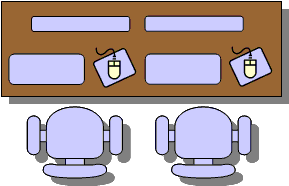 This is an ideal configuration and if you have it, you can call yourself lucky. There are not many companies that I know of that would provide their developer with such luxury. In our company we have several pairing rooms equipped with fast PCs and dual 21 inch screens with two sets of keyboards and mice.
This configuration is not only ideal from a driving point of view, but as a navigator you have a full view of the screen. Sometimes you might feel that when you are the navigator the machine is doing your work (that is if you ignore that dude on your side, but be nice to him as he might feel the same when you drive.)
Alternatively, the real estate of the two large screens can be used more efficiently by splitting the desktop. This can be done by stretching the desktop the way the one half is of one screen and the second half is on the other screen. This is useful most typically in cases when you need one window with source code and another window for testing the application (web browser for web applications.)
Laptops and pair programming
Laptops are nice little useful things. I love them. But they are not ideal for pair programming. Well, unless some special setup is done.
Read more about why the laptops are no good for pair programming.
What can we do? How can we be pair programming and using laptops at the same time?
The answer is not that difficult. All you need to accommodate the second developer is a screen, a keyboard and a mouse. Have you heard about USB? Get a USB keyboard and a mouse, and you are set. Well almost. The second developer needs to see as well. Give him/her a screen. Laptops have video outputs these days. It should be no problem to plug in additional monitor. The only
trouble might be setting up the resolution so it fits the laptop's screen as well as additional monitor's.
Alternatively you could configure the desktop to be stretched onto the second screen and this way you can use more real-estate as long as you maintain good visibility of both screens for both of you.
Office layout
So far, we have talked about the desk configuration. But what about how the desks should be organized in the office?
There are two factors to consider. Noise and communication. The communication is important not only within the pair, but also inter-pair. It is most beneficial if you can communicate quickly and when needed. The layout of the desks in the office should allow you to see and talk to other pairs easily. The layout documented in many XP books and articles describes the setting of six desks as on the picture below.
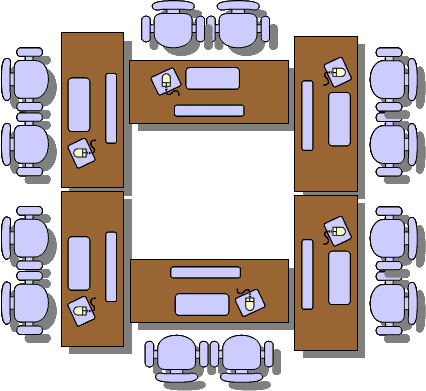 If you have enough space in the center of the room, this setup can work the best. The pairs can see each other and can talk to each other without shouting across the room. They also have a semi-private space where the pairs can work without generating too much noise disturbing the others.
These desks should be big enough to easily accommodate both developers, equipped with fast PCs and two sets of keyboards and mice. These should belong to the common area, they should not be personal caves of anyone.
We do not have this setup. We have pairing rooms that are well equipped, but they are rooms. And as such they isolate the pair from other pairs. The downside of it is that the developers very rarely communicate between pairs outside the meetings (formal or informal) when outside of the pairing rooms. Not all developers get to use these rooms. Simply, it's just too many of us and too few rooms. So we use our personal spaces for pairing as well. Neither our desks are located in the middle of room. The are lined-up along the walls and windows around the office. And so on some occasions there are big gaps between us and we have to walk across the room to talk to our peers.

No matter what the layout of the desks in your office is, try to respect the solo developers who require a quiet atmosphere for their thought flow. Pairs generate more office noise but can also effectively block out the noise generated by others. Solo programmers can not (unless they have earplugs and some loud music). Ideally, the pairs could be in a separate room from the personal spaces where we all work alone.


