Wednesday, August 16, 2006

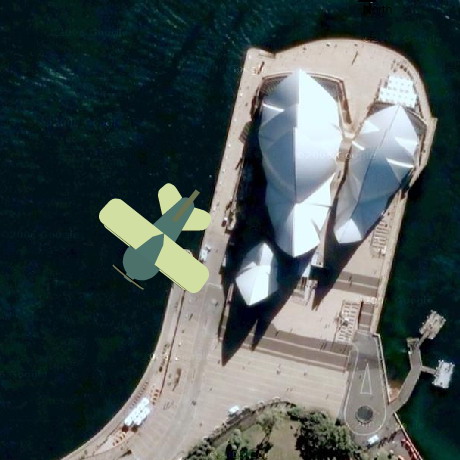
Programmable Web and GoogleMaps Fligh Simulator

Today I came across an iteresting website: ProgrammableWeb - because the world's is your programmable oyster. In their words:

ProgrammableWeb is where you can keep-up with the latest mashups, what's new and interesting with Web 2.0 APIs, and the Web as Platform in general. The core of the site is the blog and the 3 dashboards: Home, Mashups and APIs. All dashboards are updated daily.

It's worthwhile having a look at API part. And this is how I found

Quite nice app, good fun exploring the world without being scared of terrorism! And as you can see I had a few successful flights over the Sydney Opera House. But be careful! Do not fly too low, you can crash!

Sunday, August 13, 2006

Improved Map Iteration

When some one new to Java comes to play, first thing they do, they re-invent the wheel. Such wheel can be a class that is already implemented in java.util package. Yes! Collections and Maps! Later, as you become a senior Java developer you alredy know the narrow places in the "Utils" valley. And yet we can make mistakes.

Such mistake can be the following implementation of the method that calculates the size of the collection.

private Collection myStuff = ...

public int calculateSize() {
int count = 0;
for (Iterator it = myStuff.iterator(); it.hasNext(); it.next()) {
count++;
}
return count;
}

This can be easily fixed by

public int calculateSize() {
return myStuff.size();
}

Another, more frequent example of bad performance is a condition where one wants to know if there are any objects in the collection, but does not really care how many there are.

if (myStuff.size() == 0) {
// do something
}

Remember size() method may possibly calculate the size and therefore generally is slower than a call to isEmpty() method. Therefore the fix is obvious.

if (myStuff.isEmpty()) {
// do something
}

Could you imagine that I once worked for a company where the senior developers did not know about Iterators? So instead of

for (Iterator it = myStuff.iterator(); it.hasNext();) {
Object item = it.next();
// do something with the item
}

they had

for (int i = 0; i < myStuff.size(); i++) {
Object item = myStuff.get(i);
// do something with the item
}

and on top of that myStuff was a Vector, which is synchronized. Very sloooow code!

Nevertheless my point is: Know your collections!

Now back to the topic of improving the Map iteration. Well, it really depends what we need to do at each step of our iteration.

If you need to iterate over the keys of the Map do this

for (Iterator it = myMap.keySet().iterator(); it.hasNext();) {
Object key = it.next();
// do something with the key
}

And if you need to iterate over the values of the Map do this

for (Iterator it = myMap.values().iterator(); it.hasNext();) {
Object value = it.next();
// do something with the value
}

But what if we need both the key and the value? The usual approach and very bad approach is to get the set of keys, iterate over them and get the value for each key.

for (Iterator it = myMap.keySet().iterator(); it.hasNext();) {
Object key = it.next();
Object value = myMap.get(key);
// do something with the key and the value
}

What is wrong about this? Nothing! You can do it this way and it's perfectly fine. It is just very inefficient as at each iteration a map needs to look up the value for a given key. It is better to iterate over map entries. There is a special interface Map.Entry that can be used to retrieve the key and the value of each entry in the map. So the previous example can be transformed into

for (Iterator it = myMap.entrySet().iterator(); it.hasNext();) {
Map.Entry entry = (Map.Entry) it.next();
Object key = entry.getKey();
Object value = entry.getValue();
// do something with the key and the value
}

Don't forget to change myMap.get(key) to entry.getValue(), otherwise you are not gaining anything from this modification. I did this recently, I omitted to change it, even worse - I changed it to myMap.get(entry.getValue()). As a result the map was not finding anything... Luckily, we had tests around the class I modified and my stupid mistake was caught early.

Have the tests ready before making changes! Even experienced people make mistakes.

Server Polling - Reverse AJAX

I am starting to feel a bit old or old-school. I know the concepts of AJAX but never had enough time (or project) to get my hands dirty doing AJAX. So I decided to make time and learn AJAX by doing.

I joined the 10-Week Free AJAX Programming (with Passion!) online course organized by Sang Shin from Sun Microsystems. This course is in its second week now and the homework was:

"... to write one or two paragraphs describing an "interesting" AJAX related technology/feature you find while you are playing with the online demos or while reading AJAX articles on the net"

I though that it would be good to share my point of view with you. So, here I go.

Title: Server Polling - Reverse Ajax)
URL: http://ajaxian.com/archives/reverse-ajax-with-dwr

Keeping the displayed information up-to-date was always difficult in web world. Before AJAX, one had to use JavaScript or META Refresh tag to get the page refreshed. This was quite annoying from the user experience point of view. However it was not as annoying as something that I experienced few days ago on one of the banks website (a bank in Australia). I was filling out the form and there were couple of select boxes on the page. I selected an option in the select box and moved onto next field just to realize that as I was typing, the page has been reloaded and all data entered past that select-box was gone and had to be re-typed again. Very, very annoying - and it's AJAX age already!

Server polling, in my humble opinion, is a great feature of AJAX. There is no need to refresh the whole page to obtain the required information. With AJAX, it is possible to:

  • update the forms with information as the user moves through the form (e.g. country - state - city)
  • get the feedback about a long server-side or transport process (e.g. progress bar showing the percentage of the uploading file)
  • fake the push of the updated data from the server (think stock prices, weather, traffic info)

I am sure that I will come across more coolness when I start writing more and more Ajax code!

Thursday, August 10, 2006

Empty String

How many times have you coded a check for String being null or empty? Countless times, right? I have. We use some ready-to-use classes from open source frameworks or we write our own StringUtils class. More or less they all implement the same thing and it always looks similar to the following code snippet:

String s = ...
if (s == null || s.equals(""))...

or similar to the following, which trims leading and ending whitespaces

String s = ...
if (s == null || s.trim().equals(""))...

Of course you could also do this:

"".equals(s)

which is a case when you do not care if String s is null and you don't have to worry about NPE as if won't happen ("" is never null, whereas s could be). But that's another story.

I have had "extra" warnings turned on in my IDE for couple of days. But today my IDE suprised me when it highlighted

[1] s.equals("")

and suggested that I could optimize it by making it to

[2] s.length() == 0

And guess what?! The IDE was right! I looked at the suggested code briefly, gave it a bit of thought and agreed that it would probably be faster. Method [1] creates a new instance of the String (an empty String, yes I know that all instances of "" would be caught during compilation and optimized and that they all would refer to the same instance). Just to be on the safe side I looked at the source of the String class.

And here is what I found. The length() method returns and integer primitive, which is not calculated with each method call to length(). It is rather a member variable (or constant, as Strings are invariants) of String class that is calculated when new String instance is created. So this method would be super fast.

536   public int length()
537 {
538 return count;
539 }

On the other side, there is the equals() method, which is fast as well, but not as fast as length method. It has to do a check for class, class casting and comparison of count members (that's what length method returns).

684   public boolean equals(Object anObject)
685 {
686 if (! (anObject instanceof String))
687 return false;
688 String str2 = (String) anObject;
689 if (count != str2.count)
690 return false;
691 if (value == str2.value && offset == str2.offset)
692 return true;
693 int i = count;
694 int x = offset;
695 int y = str2.offset;
696 while (--i >= 0)
697 if (value[x++] != str2.value[y++])
698 return false;
699 return true;
700 }

And remember the few important points when it comes to Strings:

  • Do not compare Strings with == operator. Unless you want to compare the object references. Use equals() method.

  • Do not construct new instances like new String("abc"). Simple "abc" will do, unless you really mean that you need a new instance of String with same value. Read more about How useful is String(String) constructor

  • Do not concatenate Strings in loops using + operator. It's faster to use StringBuffer (or StringBuilder, which is in Tiger and is not synchronized) append() and then toString() methods instead. The plus (+) operator constructs new String object each time.

Saturday, August 05, 2006

Comments in Java Code

We all use comments to describe the Java code. There are three types if comments in Java as demonstrated in this Java tutorial by SUN:

// text

where the compiler ignores everything from // to the end of the line

/* text */

where the compiler ignores everything from /* to */ and

/** documentation */

which is ignored by the compiler the same way as the previous comment type. This one is a special comment as this indicates a documentation comment. The JDK javadoc tool uses doc comments when preparing automatically generated documentation.

I am not going to tell you how to use them. There are many articles and documentation written about that. We all know how to use them and most of us use them on a daily basis. Over time we can develop a stereotype. Mine looks like this:


/** first name */
private String firstName;

/** last name */
private String lastName;

/**
* Constructs and returns the full name
* @return full name
*/

public String getFullName() {
if (firstName == null) {
if (lastName == null) {
// user does not have a name specified
return "[no name]";
}
else {
return lastName;
}
}
else {
if (lastName == null) {
return firstName;
}
else {
// construct full name from first and last name
return firstName + " " + lastName;
}
}
}

As you can see, I use doc comments to describe the meaning and function of my class members. I also like to use line comments, rather than block comments. Even if my comment spans multiple lines I prefer to use // comments. It's due to my IDE settings. When I press Ctrl+/ it un-/comments the selected lines. It's very neat feature and I use it a lot.

Recently, I was doing some code modifications and I wanted to re-visit some code later. I decide to break the code by putting a comment in the middle if it, so it would not compile and I would be forced to come back to it.

I did somethig like this:


myObject.getAnother()/* change to ID */.getName();

To my surprise the code did not break. Even when I changed it to


myObject.getAnother()./* change to ID */getName();

Obviously, when I did this


myObject.getAnother().ge/* change to ID */tName();

the code broke. At the end I made it to break in a nice way, anyway


myObject.getAnother()./* change to ID */.getName();

(notice an extra dot)

All this made me thinking. Where are all the valid spots for the comments. After I read the definition for Java comments I understood why it worked, but I simply find it puzzling. Of course, we do not put comments in places like this, but the language allows us to.

I am not sure if there is any value in this lesson learnt. It would certainly make a good exam question though. I can see it now: "Will the following code compile?" ...

Saturday, July 22, 2006

Debug This!

Whilst in Korea, my cousin Ladislav Babinec took this shot. Both, he and I have a bit of electrical engineering background (he works for a T-Com originally Slovak Telecom). So we were amazed how an electrician would go about fixing this mess. Or maybe they hire only the elecricians with special puzzle solving skills. After this photo had been taken I noticed similar electric poles in many places throughout Seoul. Simply amazing! I wonder what tools do those electricians use for debugging.

Good Design

I am back from the wonderful trip to South Korea, where my wife comes from. We spent some time sightseeing Seoul and some time meeting with Miae's relatives. I am already looking forward the next time we visit Korea and will travel around the country.

Before one of the meetings we had, I had to go to a restroom. It was in a very luxurious 5-star hotel. As I was sitting there and doing my business I noticed a little white box mounted on the wall. This little device had a display and many buttons. As I can read Korean script (Hangul), but have no idea what I read, I had absolutely no clue what this magic white-box is for. Naturally, I knew there was a connection with the human waste disposal unit I was sitting on.

What was even worse was the fact the the most common button - FLUSH - was nowhere to be found. I checked the usual spots around the toilet, but I found absolutely nothing. So I decided (as a citizen of a developed country and an educated man) that I have to have a crack on this thing and must be able to flush using basic logic and common sense.

Koreans are probably laughing at me right now, but I failed miserably. I pressed few this-must-work buttons, but could not make that damn thing to flush. So I left with shame, leaving a surprise present for the lucky person who would come after me. Luckily, no one was waiting so I got away with it without too much embarrassment.

This whole story reminds me of an excellent book I read long time ago. The design of Everyday Things by Donald A. Norman talks about the good and bad design of things we use everyday. He says that if things are designed well, no manuals, no labels, no description text is necessary. You simply grab the thing and use it in a right way. How many times you tried to push the door that was meant to be pulled just because the door handle was easier to grab and push? How many times you pushed the wrong light switch because the switches were not in logical order?

Well, I don't know if it was me this time or a bad design. Why do we need so many buttons for the toilet anyway?

Tuesday, July 11, 2006

Korean Coca-Cola Zero

My "coffee" - I am happy that I can find what I need on my trip in Korea :-)

Kkokka-Kkolla Jero


What am I up to these days?

You may have been wondering why I am not blogging as frequently as I did before. Well, I am on vacation in Seoul, South Korea.

As it usually happens there are more things to see than there is time. And since July is the month with the highest rainfall, I feel lucky to enjoy so many days with very little rain so far.

The following are:

  1. Bell at the entrance to Bongwonsa - the largest of the temples, next to Inwangsan - Seoul's most famous shamanist shrine,

  2. Resting pavilon in the Korean Folk Village,

  3. Hyowon Bell at the Hwaseong (Suwon Fortress) - UNESCO World Cultural Heritage,

  4. Gyengbokgung - Palace of Shining Hapiness, the Primary Palace of Joseon Dynasty,

  5. Geunjeongjeon - the greatest building at Gyengbokgung where ceremonies of the state took place.


Tuesday, July 04, 2006

Southpark - how would you look like if you were there?

This is Miae and me in Southpark - well, the way we see ourselves.

This image was generated using the Planearium and paintbrush.


Creative Commons License This work is licensed under a Creative Commons Attribution-NonCommercial-ShareAlike 2.5 License.