Wednesday, May 24, 2006

How to reduce a risk of losing a key person

Pair programming is the answer. Let's have a look at your current project state. We will use an informal metric introduced by Jim Coplien - the "truck number" metric. The very essence of this metric is the question "How many or few people would have to be hit by a truck (or quit) before the project is incapacitated?" Obviously, the worst number is "one." How does your project score?

What can you as a manager do about the minimizing of this risk? Well, you may object that you do not want to put two people to work on a job that can be done by one. But the fact is that one of the benefits that pair programming brings is that it spreads the knowledge across the team and that in turn increases the truck number and project safety.

Monday, May 22, 2006

The Seven Myths of Pair Programming

I am lucky that I work for a company that embraces XP. Moreover, there are lots of interesting books on the shelf in our office bookshelf; books about XP, Java, Software Engineering and many more.

Last night, I started reading Pair Programming Illuminated written by Laurie Williams and Robert Kessler. It is quite easy reading and I will share my opinions about XP with you as do through the book over time. Today:

The Seven Myths of Pair Programming

  1. It will double the workload with two doing the work one can do
  2. In fact it lowers it. Two can produce a better quality code in less time and less time is spent debugging later as well. Need to say more?

  3. I'll never get to work alone. I couldn't stand that!
  4. Nonsense! You'll never spend 100% time pair programming a day. In most cases the "alone time" ranges from 25% to 50% a day. Pair programming is intense. We need to have breaks from pairing. During those we get to do stuff that you got to do, but it'd be a waste of time if done in pairs - like checking and responding to your e-mails. If you want to do some programming alone, then pick something simple. Leave the heavy stuff for pair programming.

  5. It will work well only width the right partner
  6. Again, we think that there is the "right" partner, but as we realize that we all are different and work differently, we can influence each other in many ways. Thanks to pair programming I got closer to many people in the team and feel more comfortable working with them. I feel being part of the team. Pair programming enhances the feeling of trust and improves the teamwork.

  7. Pair programming is good for training. But, once you know what you're doing, it's a waste of time
  8. Not necessarily true. It's a great way for knowledge transfer. I started working on my current project much later than my peers. Pair programming with them gave me a real boost in getting my head around the application and frameworks used. Pair programming can be looked at as never ending learning where we all learn from one another, not necessarily realizing the teaching part.

  9. I'll never get credit for doing anything I'll have to share all recognition with my partner
  10. Who cares! This is teamwork, forget your ego! Thanks to pair programming I feel stupid every day. In a good way, that is. I know I learnt a lot and I did a good job every day. You know how much you learnt and your partner will tell you if you did a great job. Don't be shy, do the same for him/her. Besides, you can develop an approach of task ownership. You pick and own the task. Then you "recruit" a partner to pair on that task with. Still there is no code ownership and you can get credit for the task well managed and done.

  11. The navigator fins only syntax mistakes. How boring is that! Compilers can do that better than humans can any way
  12. Navigator usually has the time to focus on the problem on a larger scale or consider various cases or scenarios while the driver works and concentrates on the particular one the pair is solving. This approach shortens the time - one, after finishing a step, would have to stop and think about the next step before continuing. Two, on the other hand, can work in a "flow" and maintain a steady pace.

  13. The only time I ever get any real work done is when I'm alone. Now, Ill never get anything done! Pair programming would drive me crazy!
  14. Well, pair programming is a different way. You can't get into the "flow" as described in Peopleware : Productive Projects and Teams written by Tom Demarco and Timothy Lister. But on the brighter side, if you develop in pair it does not take you 15 minutes to get back to the "pair flow" when interrupted. Plus, when people see you are busy, they are less likely to interrupt you anyway.

Pair programming has only one drawback for me so far. I don't get to listen to my MP3 collection that much, well almost at all. All that joy is left for my little home projects I work on just by myself.

Sunday, May 14, 2006

Bad API and worse coding practices

Writting a good public API is a very hard job. The API exposes some of the system's functionality and if you plan on releasing your software in the future several times, you better spend a good portion of your time on the design of the public interfaces to your system.

One of the reasons is that you do not want your API to change over time. A single change would make the new release incompatible with the previous ones and all the third-party code that was written and worked well needs to be fixed, before it can work again with your latest shiniest version.

In the past, I worked on a project where I was faced with a custom API. And let me tell you, the interface was far from ideal. Not because it changed over time, but because it was not designed well (or designed at all?) Probably designed by street-side programmers who not only exposed the API via abstract classes that you had to extend (there is this thing called Interface in Java) but also having concrete classes in the method signatures (interfaces anyone?).

For example a method looked like this

public Vector getGetNamesFromContacts(Vector contacts)...

So not only you cannot use your collection of choice but you have to use Vector. I ask you, why Vector? We all know how slow they are when compared with unsynchronized lists (e.g. ArrayList). I don't really think that the synchonization was necessary.
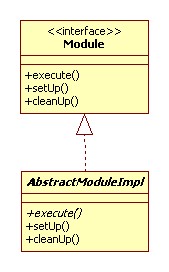
Anyway, imagine that you are given the following abstract class that you can extend. Remember, the API is really bad and you have no access to the Module interface. In fact, there may not even be such an interface. The only thing that is exposed to the outside world is the abstract AbstractModuleImpl class.
There are three methods in AbstractModuleImpl class: execute(), setUp() and cleanUp(), all are public, execute is also abstract and let's say that their signatures do not really matter at this time.

These methods are given and you can implement them in order to get the set-up before work, actual work and clean-up after work done.

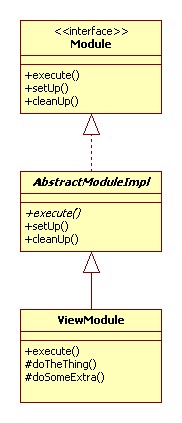
In the next step, we implement our own class. This class is named ViewModule and extends the given abstract AbstractModuleImpl class. As the super class is abstract and our class is concrete (meaning not abstract) we need to implement all methods that were defined as abstract - execute().

We also added and implemented two protected methods doTheThing() and doSomeExtra(). These methods are called from inside execute() method.
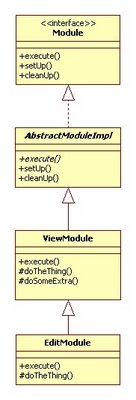
Later we also wanted to implement EditModule class. This class shares 90% of the code similarity with ViewModule. Naturally, that would be best implemented through inheritance. The base class would implement the common methods and then the concrete classes with varied functionality would be implemented as its sub-classes.

I wrote about simplicity of the design in extreme programming in my blog entry Simplicity and XP.

In our case we leave ViewModule as is and extend from it. As you can see from the class diagram EditModule class extends ViewModule class. It overrides execute() and doTheThing() methods. It does not override doSomeExtra() as this method is re-used as is.

Everything looks quite fine, right? But here comes the twist! One of the respected street-side programmers (who does not used Iterators and uses Vectors for everything he codes, just because the other API designed did) in that company told me that this approach would not work. The reason being that it would only work when our implementation class directly extends AbstractModuleImpl. He tried it before, and it did not work. I do not know what he tried, but did not want to qustion his judgement. I just took it as a fact. But still... why would anyone impose such ridiculous limitation on public API?

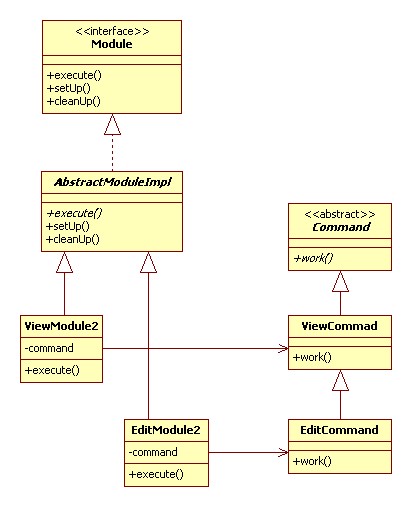
Anyway I proposed the following design. It was a bit more complicated, worked around the limitation of the API and still reused most of the code.
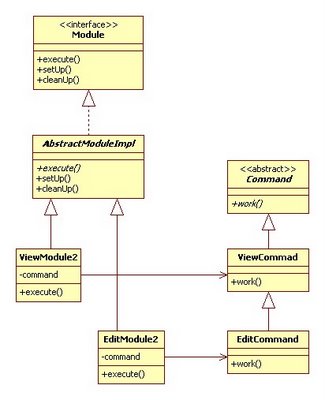
In this case ViewModule2 and EditModule2 share the only similarity, which is they call work() method on their associated command objects.

In this way I could still implement 90% of the common code in ViewCommand class and reuse it in EditCommand class. Also ViewModule2 and EditModule2 classes directly extended AbstractModuleImpl as was required.

Anyway, despite the effort, the code changes were not understood by the street-side programmers (each module should be implemented as one class so it can be delivered stand-alone) and when I returned to work on Monday the code was reverted back to original implementation before my changes and EditModule class was implemented by deadly copy-paste-modify operation (ZERO reusability) based on the code of ViewModule class.

Simplicity and XP

I like simple things. Why bother with making something complex if the simple thing works. This reminds me of the story, where NASA spent one billion dollars inventing a pen that would work in space while Russians simply used the pencil. Read more about The billion-dollar space pen myth.

Simplicity is one of the four values of Extreme Programming.

Ken Auer and Roy Miller when defining simplicity in their book Extreme Programming Applied - Playing to win, refer to the original definition by Kent Beck in Extreme Programming Explained; the simple design:

  • runs all the tests
  • contains no duplicate code
  • states the programmers' intent for all code clearly
  • contains the fewest possible classes and methods

When speaking of the simplest design, remember that finding the simplest design can be the hardest thing. But it is worth, as once found the design will be so obvious that you will wonder why it took you so long :-)

So, the moral of this short blog of mine is: stick to KISS! (keep it simple, stupid!)

Tuesday, May 02, 2006

Real Life Super Mario

I remember the days when I used to play Super Mario, but I would have never thought of this! That's bonza!


Monday, May 01, 2006

Good, bad and funny names

A read Calvin Austin's blog Java: What's in a name today and follwed few links from there. It truly made my day! We all know that guys at Sun use codenames for Java projects. Most of us know by now that Java 5.0 is Tiger and that the next version 6.0 is called Mustang. It seems that last couple of releases (including the future release) were chosen as purely animal names. Sometimes I wonder how these guys choose the names. I know it's hard. I choose the titles for my posts on this blog and it isn't easy.

Anyway, what really made me laugh was the link that lead me to the best, worst and weirdest car names chosen in automotive industry. This page, to my disappointment, missed my favourite worst car name - Mitsubishi Pajero. Majero was sold in Europe under name Montero because pajero is slang for wanker in Spanish. This car is mentioned on Grant's Auto Rant plus a lot more. Just to name a few: Chevy Nova ("It won't go" in Spanish), Opel Ascona ("female genitalia" in Northern Spain and parts of Portugal), Buick LaCrosse ("masturbating teenagers" in French-speaking Quebec), Mazda LaPuta (as the less-offensive "whore") or Bongo, Isuzu GIGA 20 Light Dump, and the list goes on.

This is not related to Java or programming in anyway, but it shows that choosing a name for car or software share the same difficulty. So how did you go about naming your software?

Working on Tasks in XP

After we get the stories from the customer, the stories are broken down to tasks, the tasks are estimated. What happens next? Well, there are two ways to go about tasks during each iteration:

  1. Do tasks one at the time,
  2. Fill your bag.

One at the time

Description:
The developers pick up the task they would like to tackle. Then they work on it until it is done, then they take another task.

Advantages:
It does not create bottlenecks. When the task is finished, you take another one. If some pair gets stuck on one, the other tasks can still be going well. This approach also makes the pair focus on one task at the time.

Disadvantages:
The task estimate is a subject to change when somebody signs up for the task.

Fill your bag

Description:
Every pair signs up for tasks until their bag for the iteration is full. The tasks are assigned by some kind of auction where developers take ownership and estimate their tasks. It is usually those who took the story and broke it down into tasks.

Advantages:
The customer can have a better idea what will get done in the iteration and by whom. Developers can also have a sense of progress and a better sense of how all tasks fit into the story.

Disadvantages:
It can create a bottleneck. Some developers might get stuck on a task or can spend more time on it.

Sunday, April 30, 2006

Windows XP Tips

Yahoo published the Top 10 Windows XP Tips Of All Time and I found some of them useful for me. So I decided to share them with you.

Tip 10: Halt background services to improve performance
Tip 9: Increase available disk space by scaling back System Restore
Tip 8: Scrub your hard drive clean
Tip 7: Run two displays on the same PC
Tip 6: Force unresponsive applications to close at shutdown
Tip 5: Automatically optimize your hard drive
Tip 4: Set a custom resolution
Tip 3: Stay on top of registry changes
Tip 2: Recover lost data
Tip 1: Automatically log when and why shutdowns have occurred
In particular I like the tips 6, 5 and 1, so here they are:

Tip 6: Force unresponsive applications to close at shutdown

  1. Launch RegEdit (select Start > Run, type regedit and click OK) and browse to HKEY_USERS\.DEFAULT\Control Panel\Desktop

  2. Find the string called AutoEndTasks. Right-click it, select Modify from the pop-up menu, and change the data value from 0 to 1. (If you can't find this string, create it by selecting Edit > New > String Value and set the data value to 1.)

  3. Close RegEdit and reboot your PC.

Tip 5: Automatically optimize your hard drive

  1. Open RegEdit and browse to HKEY_LOCAL_MACHINE\SOFTWARE\Microsoft\Windows\CurrentVersion\OptimalLayout

  2. Find the string called EnableAutoLayout, and change its data value to 1. (If this string doesn't exist, create it and set the value to 1.)

  3. Exit RegEdit and reboot your PC.

Tip 1: Automatically log when and why shutdowns have occurred

  1. Open RegEdit and browse to HKEY_LOCAL_MACHINE\SOFTWARE\Microsoft\Windows\CurrentVersion\Reliability

  2. Set the ShutDownReasonUI data value to 1. (If this string doesn't exist, create it and set the value to 1.)

  3. Exit RegEdit and reboot your PC.

The greatest tips in history of Windows XP on Yahoo!

Free Code Coverage Tools

What is code coverage? When the query "define:code coverage" is run in Google, you will find the following definitions:

  • An analysis method that determines which parts of the software have been executed (covered) by the test case suite and which parts have not been executed and therefore may require additional attention.
    www.testingstandards.co.uk/living_glossary.htm

  • Code coverage is a measure used in software testing. It describes the degree to which the source code of a program has been tested. It is distinct from black box testing methods because it looks at the code directly, rather than other measures such as software functions or object interfaces.
    en.wikipedia.org/wiki/Code_coverage

There are some great tools that will help you to measure the coverage of your code. Some are commercial, some are free. I used to use Clover that was great. I used point beta versions (0.9x) prior Clover went commercial with the release 1.0. My company did not see much value purchasing anything like that as unit testing and XP was not well know at that time. So I was using the last "free" Clover and I was happy as I got all I needed to keep track the code coverage of my unit tests.

With the explosion of open source projects on the web I was hoping that there would be a good free alternative to Clover after all those years. And there is. As a matter of fact there are many. Lets have a look at the free ones.

Good starting point for hunting for free stuff is at java-source.net. For code coverage tools follow this link. That is the one that I used and will cover in more details.

EMMA

EMMA is an open-source toolkit for measuring and reporting Java code coverage. EMMA's main features are:
  • either offline (before they are loaded) or on the fly (using an instrumenting application classloader) instrumentation,

  • coverage types: class, method, line, basic block,

  • stats are aggregated at method, class, package, and "all classes" levels,

  • output report types: plain text, HTML, XML. All report types support drill-down, to a user-controlled detail depth. The HTML report supports source code linking,

  • output reports can highlight items with coverage levels below user-provided thresholds,

  • EMMA is 100% pure Java, has no external library dependencies, and works in any Java 2 JVM (even 1.2.x).

For few sample reports generated by Emma have a look at http://emma.sourceforge.net/samples.html.

Most of my past projects used Ant for builds. Emma offers several components that expose its functionality as an ANT task and a command line tool, which is very convenient. The documentation is very well written and covers all questions that you might have.

There is also a NetBeans plug-in for Emma. Read some doco about it here.

Unfortunately, if you are looking for an Emma plug-in for Eclipse, there isn't one. Well I could not find any easily. If you do find some, please let me know. If you need a plug-in for Eclipse that will give you a code coverage, use Coverclipse .

Happy testing and getting your code coverage reports!


On May 01, 2006 Jeroen van Wilgenburg said:

You should take a look at Cobertura: When Clover went commercial the project was forked into the commercial Clover and open source Cobertura. It works with Ant, Maven2 and commandline. I think the reports of Cobertura are a bit better than Emma's
There is also an into on Getting started with Cobertura written by him.


On September 26, 2006 Marc said:

You may check out this free EMMA integration for Eclipse: EclEmma

Thursday, April 20, 2006

Don't test everything!

There was a lesson we learnt today. Don't test everything if you cannot write the universal test for it.

I recently joined the great team at Atlassian that is behind JIRA - bug tracking, issue tracking and project management and Confluence - the enterprise wiki. We released JIRA version 3.6 just few days ago and we are already working on 3.6.1. The Jira team is more or less pragmatic team and we decided that we will try to do things XP way. We started with story cards on the wall. We took one each, one meaning one pair as we also embrace the pair programming. The first stories we had were mostly outstanding issues or bugs in the current version. We nailed them very well by writing unit or func test to cover or test as much as possible and fixing the bug itself.

Unfortunatelly, there are always some things that are impossible to test. And if not impossible, then so hard to test that the time and effort spent writing such test would not be paid off by the value of the test anyway. So sometimes you can't test, but sometimes you can. The question is how far will you go with your tests. I usually write tests until at least 80% of the existing code is covered by my unit tests. It should be nearly 100% for the new code as you write the test first and then you keep implementing the class until it passes all tests, right? But for the existing code, I am comfortable with anything above 80% (your comfort zone can be different).

In this case we were creating the test around an issue with two sub-tasks and we wanted to make sure that those sub-tasks will be displayed on a particular page in the application. So we wrote the test. The test checked that these sub-tasks appear on the screen one after another. All tests succeeded and we went home happy.

Next morning we learnt a valueable lesson. Our test failed on one of the testing environments (we support and test on JDK 1.3, 1.4, 5.0 + several supported servers and RDBMS on top - helluva lot of tests run everyday, if you can imagine). There was a slight difference in one of the testing environments that resulted in the order of the sub-tasks to be different than in the others. The order of sub-tasks was not important, it was not a business rule, nor a requirement, so we removed the condition that was based on the order of the two. Now the test only verifies that the two sub-tasks are present and the order is ignored. Cool! Everything works now and what we needed is tested.

So the lesson is, stick to the principle of XP and write only minimum code required to implement the required functionality. That applies to your tests as well. Test everything you can, but don't waste time testing something that is not required. Write a test for it once it becomes a requirement.


Creative Commons License This work is licensed under a Creative Commons Attribution-NonCommercial-ShareAlike 2.5 License.