Monday, October 02, 2006

Microformats

In these days we turn for the answers to our questions to the Internet. Sometimes we even refer to it as the wisdom of the crowd.

Take IMDB for example. It is a centralized solution. When it comes to the reviews they are written by the people. But who owns these reviews? Are they real? Can we trust them? Google is the answer to all our prayers. Or as a big sign in front of one church said “Google does not have the answers to all questions.”

We saw the raise of open source. Then we also had a raise of open standards for document formats. They are getting more popular and also more important. The next step will be the open data. Standardizing the data format will also allow for more mashups. Very popular type of mashup these days is the combination of maps and some other proprietary data. If two people publish the data in two different formats, none of them can make use of the other.

Web has evolved. The move is from HTML to XHTML. The benefits are such as that microformats are simple data formats, HTML based, based on existing standards and existing development practices. To mention a few, there is hCard (based on vCard), hCalendar (based on iCal), hReview, hListing- for classfields, hResume and many more.

I also discovered that there are some Firefox extensions that discover microformats on the page and allow the user to see them. One that is worth mentioning is Tails.

Where to do from here? We all publish data on the web. More microformatted data we publish more options of their usage will be present.

More information about microformats can be found at microformats.org, microformatique.com. Read about how to highlight microformats with CSS. New book on microformats by John Allsopp will be coming out in early 2007.

Web Accessibility

I attended the Web Directions conference last week. One of the eye-opening sessions (at least for me) was “Accessibility 2.0” and “Designing for Accessibility: More simple techniques that make a difference” by Derek Featherstone from FurtherAhead.

Accessibility is about allowing disabled people to use our website. I have never worked on a project that would require access by people with disabilities. I think it really takes a real life experience to realize what these people must go through in their everyday lives. Why should we make it more difficult for them with our web applications? Do you know how many web applications stop working when you switch JavaScript off? You would be surprised to see how big number that is.

There are some guidelines that we can follow in order to make our websites more accessible. If we remove frames, replace menu images with menu using text and CSS, don't use tables for formatting, we make a big step towards accessibility of our websites. Another thing is having PDF documents on the website. PDFs are not accessible and they also need to be downloaded in order to read them and find out that it's not the document that we wanted. Another place for improvement are the web forms. Fields should have labels.

The phrase “people with disabilities don't go to our website” is just a nonsense. They do and they can also bring some revenue. Take for example Tesco Access. Grocery shopping on the web is an ideal service for visually-impaired customers. Imagine trying to tell a can of beans from a can of tomatoes on the shelf if you can't see the labels. Then think about having the description read to you by your computer. Their website was designed for accessibility and because of this feature it boosted revenue by another 4%.

Accessibility is personal. Removing barriers, user testing is personal.

Where do I go from here? Well, I will start at the roots – W3C Web Accessibility Initiative and Section 508. Then I will read Dive into Accessibility book that according to its website answers two questions “Why should I make my web site more accessible?” and “How can I make my web site more accessible?” Australia with its Disability Discrimination Act is six years ahead of USA.

I also found The Illinois Center for Instructional Technology Accessibility very informative. They list the best practices, have software for download (Accessibility Extensions for Mozilla/Firefox lives here) and lots more. Another great resource for developers is Evaluating Web Sites for Accessibility with Firefox by Patrick H. Lauke.

Some of these guidelines are very much a checklist approach. User experience is more important. Therefore we need to sit down with the real user, the one that will be using the system, and work together in order to fulfill the user's needs and expectations of this system.

Jeremy Keith presenting in Melbourne

WSG and Web Directions are hosting a presentation by Jeremy Keith.

When:
Thursday 05 October 2006 at 6:30pm

Where:
Centre for Innovation & Technology Commercialisation
Level 1, 257 Collins Street
Melbourne VIC 3000

Quotes that made me laugh today

A funny quote that came out of Web Directions conference.

The web isn’t a power drill! - Andy Clarke
It’s a series of tubes! - John Allsopp

Friday, September 29, 2006

How we built Flickr workshop and Web Directions North conference

I just came home after a two-day Web Directions South 2006 conference. This conference was a huge success. I will blog about it more later. What is next? Well, there is going to be a Web Directions North conference in Vancouver in 6-10 February next year. And if you look at the schedule, there is some skiing and boarding planned as well... just get your boss to pay for it :-)

This is a link to the upcoming one-day workshop presented by Cal Henderson on Building Enterprise Web Apps on a Budget - How We Built Flickr organized by webworkshops.

It is scheduled as following:
Brisbane 13 November 2006
Sydney 14 November 2006
Canberra 16 November 2006
Melbourne 17 November 2006

Hope to see you there!

Have you Googled Yourself?

As John DellaContrada an UB Internet-Culture Expert says in his "Self-Googling" Isn't Just Vanity; It's a Shrewd Form of Personal "Brand Management"

"Self-Googling" -- searching for your own name on the popular Google search engine -- may seem like an innocuous act of vanity, but a University at Buffalo communications professor recommends it as a shrewd form of "personal brand management" in the digital age.

I don't do this much, but how can I resist? I write this blog and few other things in other places so I wondered what people find when they search my name. So I googled my surname... I got 7 out of 10 results on the first page.

And as John DellaContrada consludes

"Starting your own Weblog or Web site can help you to shape your public image, and make sure that it accurately reflects your abilities and interests."

So what are you waiting for? Go out there and start writing!

Thursday, September 28, 2006

Good Design in Practice

I attended the first day of the Web Directions South 2006 conference today. Some of the topics that were covered today were about the design of the web sites and web pages or the design in general. Since I read The Design of Everyday Things by Donal A. Norman (which I mentioned in one of my previous posts about Good Desing) I tend to look at things in a different way. And I also appreciate the good design of the things we use. A thing can have all it needs but if not designed well it will fail as it will be unusable (see the cover of the book and you'll get the idea at least – or read the whole book).

There was one of the things that I use in my everyday life, but only today I realized how brilliantly it was designed. Derek Featherstone has apparently same eye as me as he showed us the photo that he took the day before. It was a photo of

The pedestrian crossing button

How perfect it is! Not only you can see the big white arrow but if your eyesight is impaired you can touch and feel the smaller raised arrow. And that is not all! If you cannot see it, you can hear it ticking when the green light is on. And that still is not all! If you cannot see nor hear, you can still feel it. The button VIBRATES!!! Derek said it at the conference and was all excited about it. I did not believe. I had to touch it on my way home from the conference. It is true! It does vibrate!

How cool is that?! That is a successful design in practice. Way to go designers!

What is next? Well, as a software developer I will focus a bit more on designing the web applications in a way that all people can access them, even if they have some disabilities. Sometimes we go and design things that are cool, but not usable by all of us...

Wednesday, September 27, 2006

First element in the List

Imagine this scenario. You are working on an existing application. There is a framework used. One of the benefits that this framework gives you is retrieving and processing parameters coming from the client, let's say a web application. The framework gives you all parameters as a List. Now in this particular case you always get only one parameter, but is it enclosed in the List. How do you get it out efficiently?

The intended method would be described: Get the list of parameters and if not empty, return first element in the list otherwise return null. The code was looked similar to this:

1 public E getSingleParam(List params) {
2 E param = null;
3 if (params != null && params.size() >= 1) {
4 param = params.iterator().next();
5 }
6 }

This code works fine but it has several points for improvement. First is how the code at line 3 expresses the intention of check whether the list of parameters is not null and not empty, specifically the later. List interface defines boolean isEmpty() method that is in most cases more efficient to run than getting the size and comparing it to 0 (greater than) or 1 (grater than or equal). That is if the list implements an internal flag for its "emptiness" state or has an internal counter as opposed to re-counting its elements. In the worst case scenario the efficiency will be the same as getting the size and comparing it with 0. In that case isEmpty() method is still a nice convenience method to call and should be preferred before the size() > 0 alternative. Another reason is that it speaks for itself. All we need to know is whether there are any elements in the list or not. Getting the size should be used to for other purposes (e.g. calculating the width of the table column when displaying the results in a tabular form – 100% / size()).

1 public E getSingleParam(List params) {
2 E param = null;
3 if (params != null && !params.isEmpty()) {
4 param = params.iterator().next();
5 }
6 }

The second point of making the code to perform better and to make it easier to read is the line 4. On this line we are getting the first element of the list. As shown in the example above, this is an inefficient way as we construct an Iterator only for the purpose of one iteration. Constructing new objects and disposing of them is usually expensive and should be avoided. A better way is to access the element directly, such as:

1 public E getSingleParam(List params) {
2 E param = null;
3 if (params != null && !params.isEmpty()) {
4 param = params.get(0);
5 }
6 }

This way no new objects are constructed (no Iterator). Another difference between the two is the exception that could be possibly thrown. The exception would be thrown if we did not have the previous check or in the case of concurrent modification of the list which is very unlikely in this case. The exception thrown in first case would be a NoSuchElementException. In the second way, an IndexOutOfBoundsException would be thrown. Both of them are runtime exceptions and do not have to be declared. In this case getting one exception or the other should not make any difference.

Tuesday, August 22, 2006

Tricky instanceof operator

Let's start with a little puzzle.

Object obj = ...
System.out.println(obj instanceof Object);

How do you initialize the obj in order to print "false"?

Well, aren't all possible Java objects instances of Object? To answer this question one must understand how instanceof operator works. The answer is that it would print "true" for any Object. The only way to make it false is not to give it an object, give it a null reference.

The tricky bit about instanceof operator can be that if object on the left side is null, the condition evaluates to false. Therefore there is no need for null check after a class cast as in the following example.

public boolean equals(Object o) {
if (o instanceof MyClass) {
MyClass mc = (MyClass) o;
if (mc == null) // never null
return false;
else
return ... // compare members of mc
}
return false;
}

This can be simplified as shown in the following code snippet

public boolean equals(Object o) {
if (o instanceof MyClass) {
MyClass mc = (MyClass) o;
return ... // compare members of mc
}
return false;
}

So the moral if this excercise is that instanceof operator works as you would expect with objects, and returns false when given a null.

And remember that equals() method is probably the only reasonable place for instanceof operator. If you do it elsewhere and use it to create an alternative flow (e.g. if-else, switch) it is a bad smell and should be replaced with polymorphism. Read more about Swich Statement code smell and Polymorphism

BTW the previous example was not a very nice example of how to implement equals method, so do not copy it ;-) Usually we would do something like this

public boolean equals(Object o) {
if (o == null) return false;
if (o == this) return true;
if (!(o instanceof MyClass)) return false;
MyClass mc = (MyClass) o;
return ... // compare members of mc
}

Saturday, August 19, 2006

Swich Statement code smell and Polymorphism

One of the symptoms of object-oriented programming is the lack of switch or case statements. Imagine that we have some client class that calculates the area and perimeter of particular geometrical shapes.

public class Client {
private double a;
private double b;
private double r;
...
public double calculateArea(int shape) {
double area = 0;
switch(shape) {
case SQUARE:
area = a * a;
break;
case RECTANGLE:
area = a * b;
break;
case CIRCLE:
area = Math.PI * r * r;
break;
}
return area;
}

public double calculatePerimeter(int shape) {
double perimeter = 0;
switch(shape) {
case SQUARE:
perimeter = 4 * a;
break;
case RECTANGLE:
perimeter = 2 * (a + b);
break;
case CIRCLE:
perimeter = 2 * Math.PI * r;
break;
}
return perimeter;
}
...
}

The previous code is clearly a poor design that limits the current client to only work with three types of shapes. The problem with switch statements is the duplication and that is a code smell. There are usually several places in the code where the behaviour slightly deviates and these switch statements are present (e.g. in calculateArea and calculatePerimeter methods). Even worse case is if we work with objects where the switch is replaced by multiple instanceof conditions.


public class Client {
...
public double calculateArea(Object shape) {
double area = 0;
if (shape instanceof Square) {
Square square = (Square) shape;
area = square.getA() * square.getA();
}
else if (shape instanceof Rectangle) {
Rectangle rectangle = (Rectangle) shape;
area = rectangle.getA() * rectangle.getB();
}
else if (shape instanceof Circle) {
Circle circle = (Circle) shape;
area = Math.PI * cirle.getR() * cirle.getR();
}
return area;
}

public double calculatePerimeter(Object shape) {
double perimeter = 0;
if (shape instanceof Square) {
Square square = (Square) shape;
perimeter = 4 * square.getA();
}
else if (shape instanceof Rectangle) {
Rectangle rectangle = (Rectangle) shape;
perimeter = 2 * (rectangle.getA() + rectangle.getB());
}
else if (shape instanceof Circle) {
Circle circle = (Circle) shape;
perimeter = 2 * Math.PI * cirle.getR();
}
return perimeter;
}
}

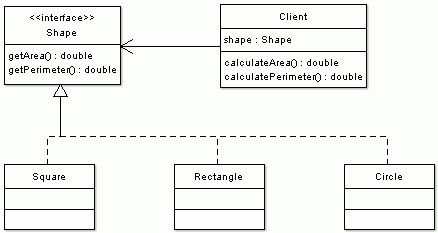
To improve the desing we make Square, Rectangle and Circle have a commont root. By that I mean that they either extend the same class, such as AbstractShape or that they implement a common interface, such as Shape or ideally both.

Then we can eliminate the switch statement code smell very easily. We replace it with polymorphism.

Shape.java file
public interface Shape {
public double getArea();
public double getPerimeter();
}

Square.java file
public class Square implements Shape {
private double a;
...
public double getArea() {
return a * a;
}
public double getPerimeter() {
return 4 * a;
}
}

Rectangle.java file
public class Rectangle implements Shape {
private double a;
private double b;
...
public double getArea() {
return a * b;
}
public double getPerimeter() {
return 2 * (a + b);
}
}

Circle.java file
public class Circle implements Shape {
private double r;
...
public double getArea() {
return Math.PI * r * r;
}
public double getPerimeter() {
return 2 * Math.PI * r;
}
}

And such refactoring simplifies the Client code. It also allows for easy extensibility by implementations of other shapes without changing a single line of Client code.

public class Client {
private Shape shape;
...
public double calculateArea() {
return shape.getArea();
}
public double calculatePerimeter() {
return shape.getPerimeter();
}
}

Another way of looking at it is from the responsibility point of view. Why should the client be responsible for calculating the area or the perimeter; or have a knowledge about shape's internals (e.g. number of sides, radius, etc.) It is the responsibility of each shape and all that the client needs to know is that a shape has a perimeter and area.

To sum this all up:


Creative Commons License This work is licensed under a Creative Commons Attribution-NonCommercial-ShareAlike 2.5 License.